Dave Moore
Updated On : Tue, July 22, 2025Opt Out Guides

Your personal information shouldn’t be exposed online for anyone to find. Veripages is a site that collects and displays sensitive details like your address, phone number, and family connections, which can lead to identity theft, spam, or safety risks.
However, the good news is that opting out of Veripages is easier than you might think. In this quick guide, we’ll walk you through three simple steps to complete the Veripages opt-out process.
If you’ve decided to keep going, don’t stop here—check out our other guides to safeguard your privacy from more data brokers.
Quick Facts About the Veripages Opt Out Process
Estimated Manual Data Removal Time: 15-30 minutes (Note: This is the time it takes to submit a data removal request. It may take more than four days for Veripages to fully remove your information.)
Estimated Data Removal Time With Privacy365: 3 minutes
What You Need to Remove Your Data: Full name, city, state, and email address
What Is Veripages Used For?
Veripages is a public records search engine that allows you to find personal information about people. By simply entering a name and location, you can access details such as home addresses, phone numbers, work history, criminal records, and more.
Like many other people search sites, Veripages makes money by selling its data to third parties and offering “full reports” through monthly subscriptions.
Without paying a fee, you can only view a summary of the person you’ve searched for, which doesn’t include detailed information such as marriage records, property ownership, or family connections.
How Does Veripages Get Information?
Veripages collects publicly available data from a variety of sources and compiles it into a searchable database. It pulls information from public records like property ownership, court records, and business registrations.
The site also gathers details from online profiles and social media platforms where people may have shared personal information.
Veripages may also obtain data from third-party brokers or companies that specialize in marketing information. All of this data is combined to create a detailed profile about you
Pro Tip: Removing your data from Veripages and other people search sites is quick and easy with Privacy365. It can help you keep your personal information safe and secure with just a few clicks.
Why You Should Remove Your Information from Veripages
Opting out of Veripages helps protect your privacy and security by reducing the risks of identity theft, unwanted attention, and data misuse. Removing your profile makes sure that your personal information stays private and secure.
Here are some reasons why you should opt out of Veripages:
1. Prevent Identity Theft
Criminals can misuse personal information like names, addresses, and phone numbers to steal your identity or commit fraud.
2. Avoid Unwanted Calls and Spam
Marketers and telemarketers often use data from these sites for cold calls, emails, or other unwanted contact.
3. Stay Safe from Stalkers
Publicly available data on Veripages can be exploited by stalkers or individuals with malicious intent. While Veripages doesn’t intend for this to happen, it’s a risk you should be aware of.
4. Maintain Control of Your Privacy
Profile removal from Veripages helps you regain control over your personal data and reduce the risks of breaches or misuse.
What Does Veripages Know About Me?
Veripages collects and displays a variety of personal details. Here’s a more detailed list of what you might find:
- Full Name and Any Known Aliases: This includes your legal name and any variations or alternate names linked to you.
- Current and Past Addresses: Your home addresses, previous residences, and sometimes even previous property ownership.
- Phone Numbers and Email Addresses: Both current and past contact information, including mobile numbers, landlines, and email addresses associated with you.
- Family Members and Connections: Information about your relatives, including parents, siblings, children, and other close connections.
- Criminal Records and Legal History: Any criminal background, including charges, arrests, or convictions, as well as any legal actions tied to your name.
- Property Ownership Details: Information about properties you’ve owned or currently own, including addresses and dates of purchase.
- Business Affiliations: Any businesses you’ve been linked to, including current or past employment or business ownership.
- Social Media Profiles and Online Activity: Veripages might pull from publicly available data on social media platforms, aggregating your online activity.
Veripages Removal Process: How to Remove Your Data from the Site
Removing your personal information from Veripages is straightforward, but it does require a few key steps and some patience. Here’s a quick step-by-step guide to help make the profile removal process as simple as possible.
How to Remove Yourself From Veripages Manually
Here’s how you can opt out of Veripages manually:
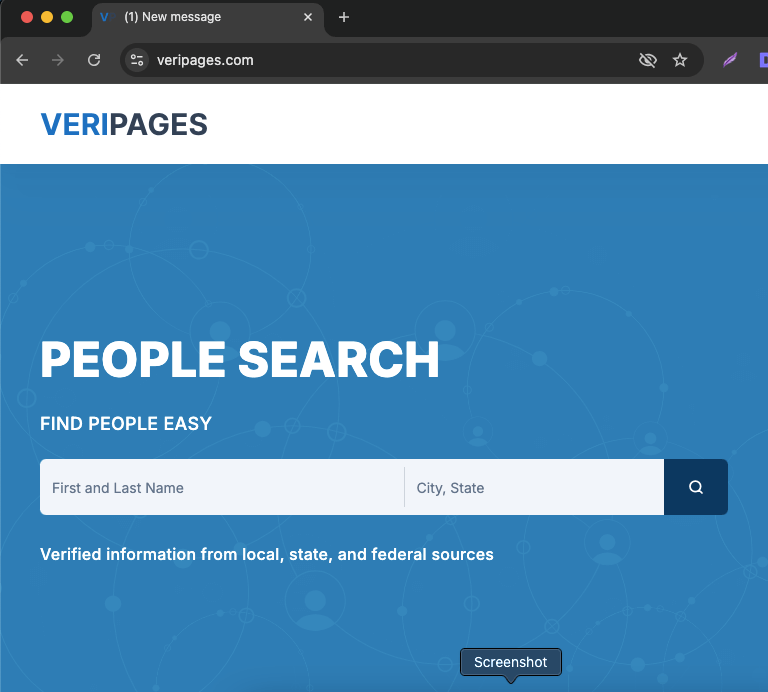
Open your preferred web browser, such as Chrome, Safari, Firefox, or Microsoft Edge. Then, go to the official Veripages website by typing “veripages.com” into your browser’s address bar and pressing “Enter.” You will see something like this:
Search for your Veripages profile by entering your full name in the left search bar and your city and state in the right search bar. This will display a list of potential matches.
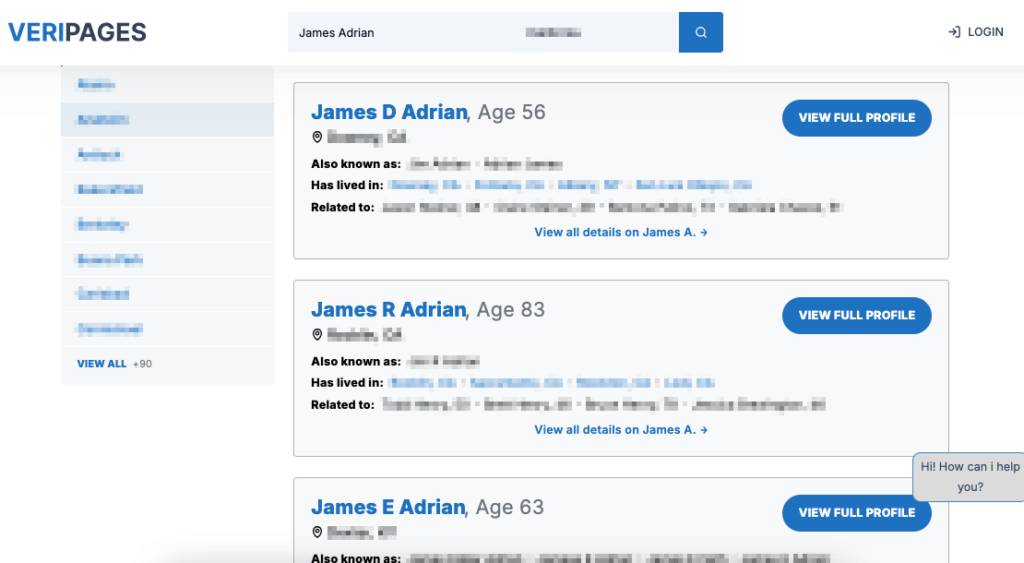
Open your Veripages profile by browsing the search results and clicking on “View FullL Profile” for the match that closely resembles your details. This will take you to your profile page, where you can view all the personal information listed about you, including your name, address, and other details.
Once you have your profile open, copy the web address (URL) from the address bar at the top of your browser. Veripages needs this URL to process your opt-out request. And it will look like this:
??https://veripages.com/profile/James-Adrian/ABF9B5HI
Note: This is just a sample URL, not an actual link, and it has been intentionally altered to protect the person’s identity.
Go to the Veripages Opt-Out Page. You can find the link to the opt-out page in the FAQ section or simply click on this URL: https://veripages.com/inner/control/privacy. This is where you’ll submit your request to have your profile removed.
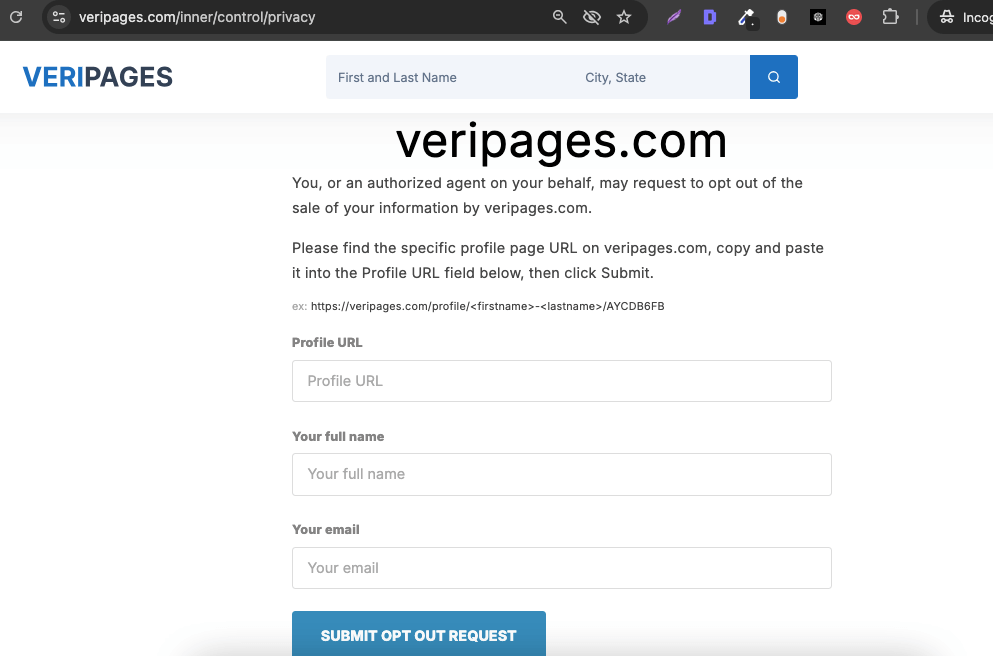
On the opt-out page, paste the URL of your profile in the “Profile URL” field. Enter your full name in the next field, then provide your email address in the relevant section.
Finally, click “Submit Opt-Out Request.” This step is important because Veripages will need to confirm your profile removal request. Make sure all the information you enter is accurate!
Veripages will send a confirmation email to the address you provided. Open the email and click on the link inside to start the process of removing your profile from Veripages.
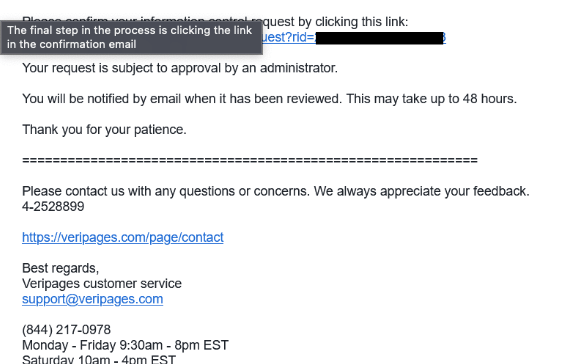
After confirming your opt-out request, you’ll be redirected to a confirmation page with a tracking ID. Save it to monitor the status of your request.
Veripages can take up to four days to remove your profile, but sometimes it may take longer. If your profile remains visible after a week, contact Veripages’ support for assistance.
Keep Your Privacy Secure Today
As you’ve seen, removing your information from Veripages with Privacy365 is quite easy. Doing it manually, on the other hand, can take a lot of time. It involves searching for your profile, filling out the request form, and then waiting for Veripages to process it, which can take 4-6 days.
With Privacy365, you can skip all that time-consuming work. It makes it easy to opt out of multiple data broker sites at once, so you don’t have to keep repeating the same process over and over.
Frequently Asked Questions About the Veripages Opt Out Process
Is Veripages a Legitimate Website?
Yes, Veripages is a legitimate site. It collects publicly available information from public records, such as addresses, phone numbers, and criminal records. This data is accessible by anyone, but Veripages makes it easier for people to find and search through it. While it’s legal to gather and display this data, the privacy implications are something to be aware of.
How Much Time Does It Take to Opt Out of Veripages?
The Veripages opt-out process usually takes only a few minutes to complete. However, it can take up to four days or longer for your profile to be removed. In some cases, there may be delays.
Why Can’t I Opt Out of Veripages?
Opting out of Veripages can be tricky due to its multi-step process. You’ll need to find your profile URL, submit it with your name and email, and confirm your request via email. Common issues include the confirmation email landing in your spam folder, entering incorrect details, or technical delays.
If you’re still having trouble removing your profile, you can always reach out to Privacy365 for help.
Remove More Data With Privacy365
Opting out of Veripages can be a hassle. The process is slow and confusing and may require extra verification. Plus, there’s always a chance that your information could end up back on there later.
With Privacy365, you can protect your privacy across the board. It saves you time and effort, making sure your personal info stays out of the hands of anyone who doesn’t need it. Keep your details secure and take control of your online presence with Privacy365.