Evelyn Sanderson
Updated On : Fri, August 22, 2025Opt Out Guides

With data collection and aggregation becoming increasingly pervasive, most online users feel they’ve lost control over their personal information. A recent KPMG study highlights that data privacy is a growing area of concern for nearly 86% of Americans, reflecting a broader awareness about how information is shared and accessed online.
One place this information may appear is PeekYou, a people search platform that organizes publicly available details from social media, blogs, and public records into a single profile. While its purpose is to make it easier to locate people and connect with them, you might prefer to limit the visibility of your own profile for privacy reasons.
This guide walks you through how to complete a PeekYou opt out request, covering both the manual process and the faster, multi-site removal option available through Privacy365. For more on managing your personal information, see our other Privacy365 data removal guides.
Important Points to Note About PeekYou Removal
Estimated Manual Data Removal Time: 10 to 15 minutes.
Estimated Data Removal Time With Privacy365: 2 to 3 minutes
What You Need to Remove Your Data:
- A valid email address (to confirm your removal request).
- The PeekYou profile link you want to remove.
- Internet access to complete and verify the opt-out request.
What Is PeekYou?
PeekYou is a people search platform that collects and organizes publicly available information from a wide variety of online sources. The site scans the web for details connected to an individual’s name, username, or other identifiers, then compiles them into a single, easy-to-browse profile.
One of the features that sets PeekYou apart from many similar services is its emphasis on social media connections. In addition to indexing current, active profiles, it may locate older or less frequently used accounts that are still accessible online.
This ability to consolidate a broad range of publicly available content makes PeekYou a useful resource for reconnecting with acquaintances, verifying identities, or tracking down long-forgotten online activity.
How Does PeekYou Get Information?
PeekYou crawls the internet for public pages tied to your name, email, or username. It indexes:
- Social media pages (public visibility).
- Web forum posts.
- Business directories.
- Blog platforms.
- News articles.
Once found, it organizes them into a single profile that’s searchable by the public.
Pro Tip: Privacy365 can remove your details from PeekYou and dozens of other people search sites at once, saving you from repeating this process site-by-site.
Benefits of Opting Out of PeekYou
When your information appears on a people search site, it’s available to anyone who runs a search, whether they know you personally or not.
Opting out of PeekYou can help you take back some control over what details are easily accessible online. This can be especially valuable for those who value a smaller digital footprint, work in sensitive professions, or simply prefer to keep their personal life more private.
By submitting a PeekYou opt-out request, you can reduce the likelihood of your information being used in ways you didn’t intend, such as limiting:
- Unwanted contact from strangers.
- The risk of identity theft or fraud.
- Easy compilation of your personal history by data brokers.
- Exposure of outdated or inaccurate information.
Taking your information off PeekYou won’t erase it from the internet, but it will make it harder for casual searchers to quickly piece together your personal details.
What Type of Information Can You Find About Yourself on PeekYou
If you search your own name on PeekYou, the results may reveal a surprising range of publicly available details that have been compiled from across the internet. These profiles are generated from information that’s already in the public domain, meaning they don’t require special access or permissions to locate.
What makes PeekYou notable is the way it centralizes that information, presenting it in a format that’s easy for anyone to browse. The types of information that can appear on a PeekYou profile often include:
- Public Social Media Profiles and Photo Galleries: Links to accounts on platforms like Facebook, Instagram, LinkedIn, X (Twitter), and more, along with any public images associated with them.
- Blog Posts or Forum Discussions: Mentions of your name or username on blogging platforms, community boards, or niche discussion groups.
- Mentions in Online News Articles: References in local or national news stories, announcements, or press releases.
- Professional Listings and Business Profiles: Entries from industry directories, company websites, or freelancing platforms.
- Public Records: Information from government or other public databases, such as historical address records or property details.
While all of these data points are gathered from open sources, you will be surprised by how much of your online footprint becomes visible when consolidated into a single listing.
Steps to Opt Out of PeekYou
If you decide to remove your profile from PeekYou, you have two main options. The first is to submit a manual opt-out request directly through PeekYou’s online form. The second is to use Privacy365, which can handle the request for you while also removing your data from many other people search sites at the same time.
How to Opt Out of PeekYou Manually
If you’d like to submit your own removal request, PeekYou provides an online form that allows you to request deletion of your profile from its search results. Here’s how to do it:
Go to the PeekYou Opt-Out Page
Open your preferred web browser and visit the PeekYou opt-out form.
Search for Your Profile on PeekYou

In a separate browser tab, use PeekYou’s search bar to look up your name. If your name is common, you may need to add more details to narrow the results. This is necessary for submitting a removal request, as every individual who’s on Peekyou has a unique profile ID.
Copy the Profile URL
Once you’ve verified the listing, click into the browser’s address bar, highlight the full web address, and copy it.
Fill Out the Opt-Out Form and Submit Your Request
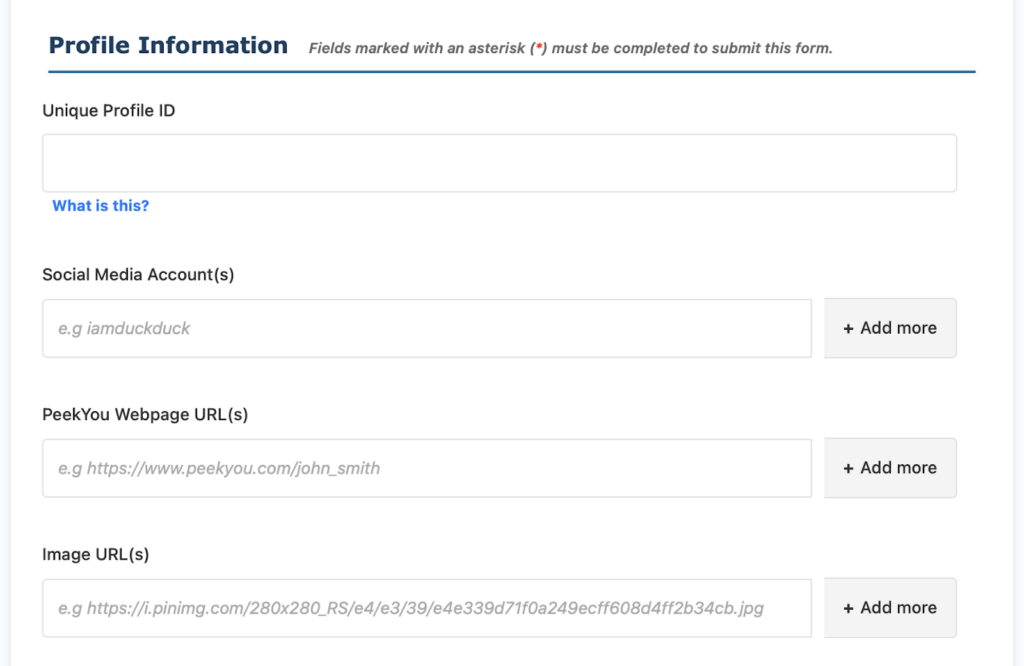
Return to the opt-out page and paste the copied URL into the form’s designated field. Enter a valid email address that you can access easily, as PeekYou will use this to send a confirmation link. Complete the CAPTCHA to verify, then click the ‘Submit’ button.
Confirm Your Request via Email
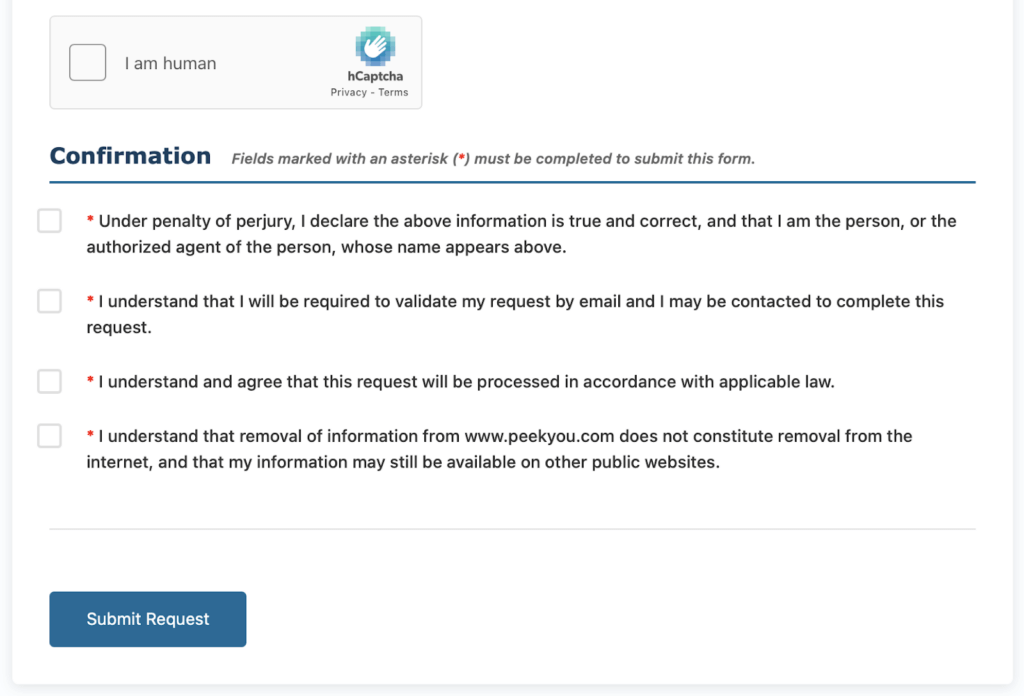
Within a short time (usually within minutes), PeekYou will send an email containing a confirmation link. ‘Open’ the message, click the link, and follow any on-screen prompts to finalize the request. Without this step, your removal will not be processed.
Following a successful confirmation, PeekYou typically processes removal requests within a few business days. During this period, your listing may still appear in search results until the removal is complete. You can revisit PeekYou after a week to verify that the profile is no longer visible.
Clear One Listing, Clear the Rest
Removing your profile from PeekYou is a great start, but your personal information may still be accessible on other people search sites. Taking the time to opt out of multiple platforms can further limit how easily your details can be found. Visit our other Privacy365 opt-out guides to continue building a stronger layer of online privacy.
Keep Your Information Safe With Privacy365
Opting out of services manually can be time consuming, and it doesn’t always guarantee that your sensitive data stays off those sites. Luckily, Privacy365 can help. We monitor hundreds of sites like PeekYou 365 days a year so you can always rest assured.
Common Queries About PeekYou Opt Out
How Long Does PeekYou Removal Take?
Manual PeekYou removal requests are typically processed within a few business days after you confirm the request via email. However, the exact time can vary depending on processing volume. Using a service like Privacy365 can speed up the process and handle removals from other sites at the same time.
How to Delete My PeekYou Profile Completely?
To delete your profile from PeekYou’s search results, you must submit a removal request through their opt-out form and confirm it via email. This process removes your listing from PeekYou, but does not delete the original public records or web content that the profile was based on.
How to Remove Myself From PeekYou and Other Sites at Once?
If you want to remove yourself from PeekYou and multiple other people search platforms in one process, our service can submit bulk removal requests for you. This approach helps ensure your information is cleared from multiple databases quickly, without repeating the manual steps for each site.
Will My PeekYou Profile Reappear After Removal?
It’s possible for a new profile to be created in the future if PeekYou indexes new or updated public information that matches your details. Regularly checking the site and monitoring your online presence can help you address any reappearances promptly.
Protect Your Privacy Easily With Privacy365
Manually removing your profile from PeekYou is effective, but it can be time-consuming if you need to opt out of multiple sites. Privacy365 takes the work out of the process by handling removals for you, so you don’t have to track down each service or repeat the same steps over and over.
With one request, you can remove your information from PeekYou and many other platforms at once.