Dave Moore
Updated On : Wed, September 10, 2025Opt Out Guides

When your name and contact details show up in big databases, there’s a higher chance your privacy could be compromised. Many people want to control what others can see. The LexisNexis opt out process gives you a clear way to remove your personal records from certain LexisNexis products.
This guide explains what LexisNexis is, the data it collects, and why you might want to opt out. Most importantly, it shows two practical ways to remove your information: do it yourself or use Privacy365 to handle it for you.
Make sure you check out our other opt out guides to learn more about removing your personal data from various databases.
Quick Facts About the LexisNexis Opt Out Process
Estimated Manual Data Removal Time: 20-40 minutes to complete the online form and upload any required files (assuming you’re already prepared with the necessary documents).
Estimated Data Removal Time With Privacy365: 3-7 minutes to submit your details, and Privacy365 handles the rest.
What You Need to Remove Your Data:
- Full legal name.
- Current street address.
- Any recent past addresses you want removed.
- An active email address you check.
- Phone number (if listed).
- Supporting documents, if needed, such as a police report, court order, or a letter from a supervisor.
Note: Do not share your Social Security number unless the form explicitly asks for it and you are confident it is secure.
What Is LexisNexis?
LexisNexis operates large public-record and legal data systems. Professionals use these systems for background checks, fraud detection, legal research, and compliance checks. The site gathers public documents and combines them into searchable profiles.
LexisNexis stands out because it serves both commercial and government customers, making its databases more extensive and widely used than many smaller broker sites. The company follows legal guidelines on which records can be displayed and which must remain protected.
How Does LexisNexis Get Information?
LexisNexis pulls data from many public and licensed sources. These include court filings, property records, business filings, and other public documents. It also uses licensed feeds and partner data. Once collected, this data becomes part of search tools used by businesses and government groups.
Pro Tip: If you want to remove your data from multiple sites at once, Privacy365 can submit the requests for you, saving you time on each form.
Why Should You Opt Out of LexisNexis?
Keeping your info out of big databases reduces risk. It lowers the chance that scammers find your phone number or address and can also cut down on spam and unwanted contacts. If you’re concerned about identity theft or stalking, opting out adds an extra layer of protection.
Here are some other benefits of opting out of LexisNexis:
- Reduced online exposure
- Lower risk of targeted scams
- Fewer listings with marketing and data broker sites
What Information Does LexisNexis Collect?
LexisNexis may collect the following types of information:
- Full name and known aliases.
- Current and past addresses.
- Phone numbers.
- Date of birth (where public).
- Property and deed data.
- Bankruptcy and court records.
- Professional licenses and business ties.
- Family or known associates.
Your profile on LexisNexis may have all of this information, depending on the public records on you that it’s able to find.
How to Remove Yourself from LexisNexis
You have two choices. You can submit a manual opt out on the official form. Or, you can use Privacy365 to do the heavy lifting for you. Below are both sets of steps. Use the one you prefer.
How to Delete Your Data From LexisNexis Manually
To opt out of LexisNexis, visit their official opt-out page and fill out the online form with your personal details.
Include the reason for your opt-out request and submit it. If it involves identity theft or risk of physical harm, provide supporting documents such as a police report or court order. The request will be reviewed and can take up to 30 days to process.
Here’s a step-by-step process of how to do it:
- Go to the official LexisNexis opt-out page.
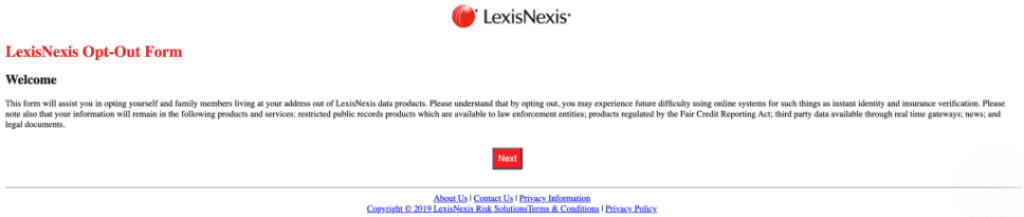
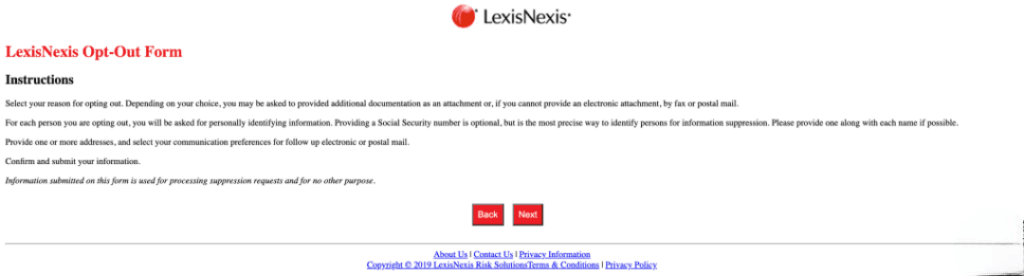
- Go through the welcome and instructions screens and read them carefully.
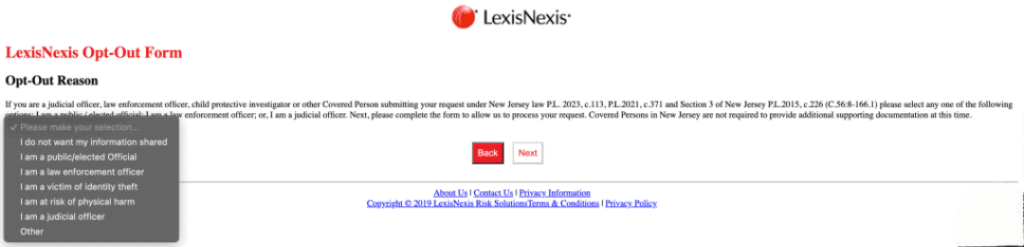
- Select your reason for removal. For most people, “I do not want my information shared” works. If your case involves identity theft or risk of harm, choose the corresponding option.
- Enter your full name and current address. Add past addresses if you want them removed.
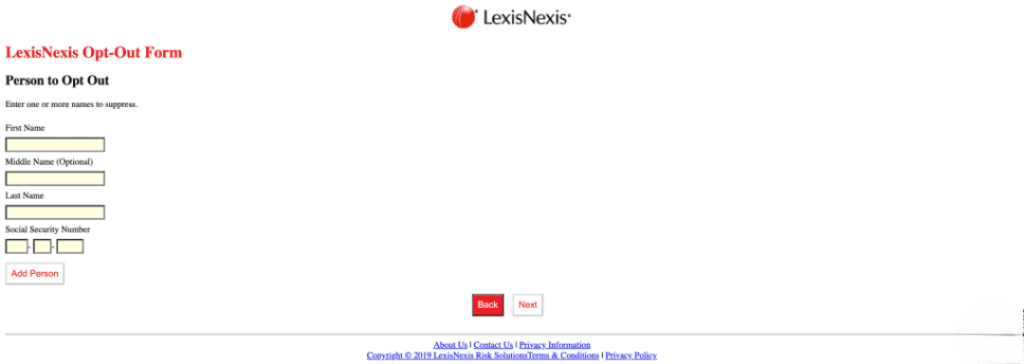
- Provide the address you want to remove from LexisNexis.
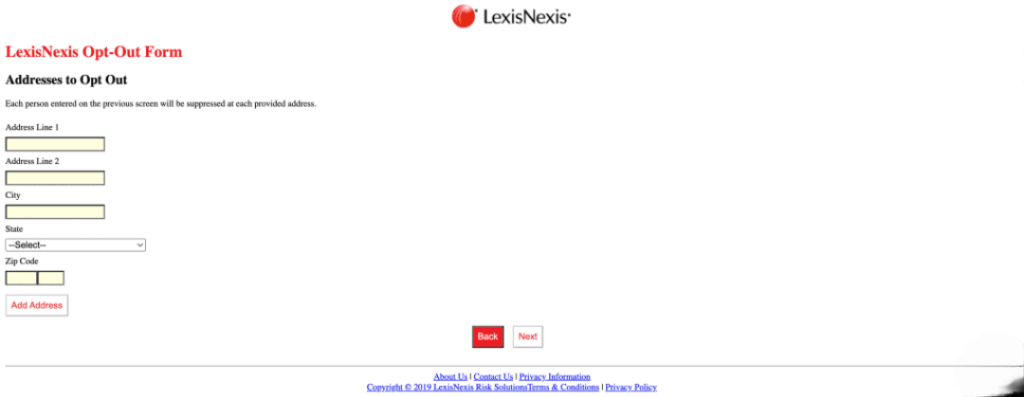
- Upload any required documents if your reason requires proof, such as a police report, court order, or letter from a supervisor. If uploading isn’t possible, you can submit them by mail to LexisNexis Individual Requests for Information Suppression, PO Box 933, Dayton, OH 45401, or by email to privacy.information.mgr@lexisnexis.com.
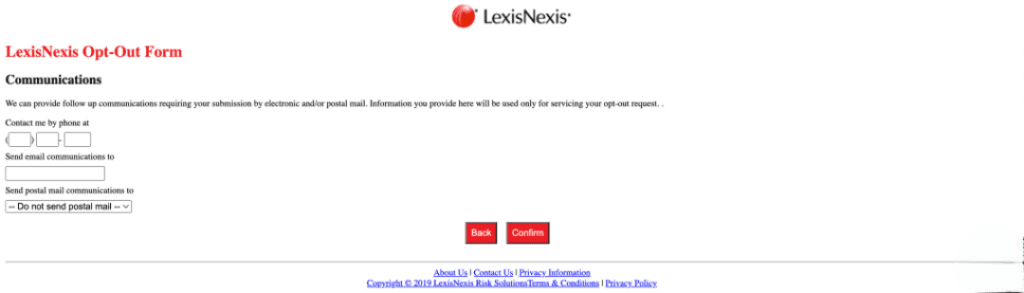
- Check all the information you provided, then submit the form. Make sure you save the confirmation number or take a screenshot of the confirmation page.
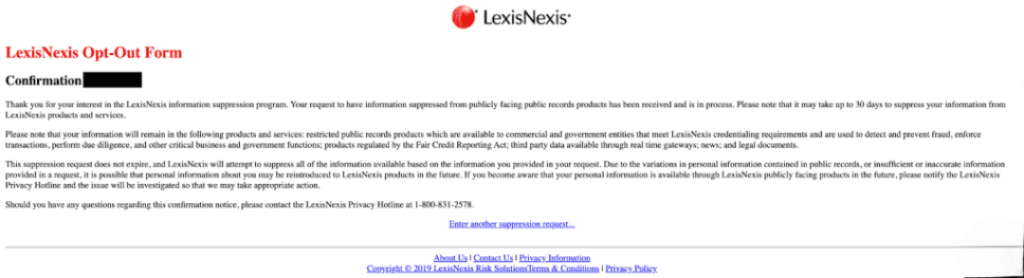
- Wait for the request to be processed. The company may reach out for additional details, and it can take up to 30 days for your data to be removed.
Only provide sensitive information like your full Social Security number if the form clearly requires it and you can submit it securely. Most people remove records without sending their SSN.
If you need to prove identity theft or risk, gather the required documents and include a brief, clear cover letter. If LexisNexis denies your request, ask for the reason in writing and either reapply with clearer documents or follow up using the contact email provided.
Sample short LexisNexis opt-out letter (use if mailing documents):
To Whom It May Concern,
I request suppression of my personal records under the Individual Requests for Information Suppression policy. My details are below. I enclose [police report/court order/supervisor letter] as proof. Please confirm receipt and provide a suppression confirmation number.
Name: [Your full name]
Address: [Your current address]
Email: [Your email]
Phone: [Optional]
Thank you,
[Your name]
What to Do After LexisNexis Removal
Even after opting out of LexisNexis, it’s important to regularly check their search results and other broker sites, since public records can reappear over time. If your information still shows up, submit a new suppression request or follow up using the contact email.
Privacy365 makes this easier by providing guides for opting out of LexisNexis and other data broker sites, and it can handle requests and monitor responses for you, saving time and making sure nothing gets missed.
One Opt-Out Is Just the Start of Better Privacy
Now that you know how to opt out of LexisNexis, don’t stop there. There are plenty of other websites that collect and display personal information, making it accessible to anyone. Each site may have its own process, which can make removing your data manually a real headache.
If you want to save time and reduce the stress of doing it all yourself, Privacy365 is a great option. It helps you remove your information from multiple sites at once, making it much easier to protect your privacy.
Frequently Asked Questions About the LexisNexis Opt Out Process
Here are some commonly asked questions about opting out of LexisNexis:
Is Opting Out the Same as Freezing My Credit?
No. A credit freeze blocks access to your credit report. Opting out removes your personal data from certain public-record products. Do both if you want wider protection.
Does LexisNexis Have an Opt-Out Email?
Yes. You can send supporting documents to privacy.information.mgr@lexisnexis.com. Use the online form first, then send an email if the system doesn’t accept uploads.
Will LexisNexis Remove Everything About Me?
No, the opt-out policy only covers certain LexisNexis databases. Records used by law enforcement or covered by specific laws may still be accessible to authorized users.
How Long Does the LexisNexis Opt Out Request Take?
The opt-out process for LexisNexis can take up to 30 days. Keep your confirmation number and follow up if you don’t receive a notice.
Can LexisNexis Add My Information Again Later?
Yes, new public records or data sources can make your information reappear. Regularly checking and submitting follow-up requests helps keep your profile limited.
LexisNexis Opt Out: Regain Control of Your Data Using Privacy365
Opting out of LexisNexis is a smart way to take back control of your personal data and reduce your exposure to scams, marketing, and privacy risks. Doing it manually can be a bit of a hassle, but that’s where Privacy365 comes in.
It helps you remove your info from multiple sites at once, saving time and effort. Even after opting out, some records might pop up again, so it’s a good idea to keep an eye on things. With regular checks and the right tools, protecting your privacy has never been easier.