Dave Moore
Updated On : Tue, November 25, 2025Opt Out Guides

Do you want to stop ads and promotions on Discord, avoid forced arbitration, and cut future charges from Nitro? This Discord opt-out guide explains how to remove yourself from the platform’s arbitration clause and turn off data and Quest personalization.
You will also learn how to manage beta or experimental exposure, cancel Nitro, and adjust broader “privacy-first” settings inside the app. If you want to learn more about data removal, take a look at our other data removal guides.
Things to Know Before You Start the Discord Opt Out Process
Estimated Manual Data Removal Time: 15-25 minutes for sending an opt-out request, not including processing or confirmation steps.
Estimated Data Removal Time With Privacy365: It takes just 2-3 minutes with Privacy365 to complete your Discord opt-out and easily remove your data from other sites simultaneously.
What You Need to Remove Your Data: Access to the email linked to your Discord account and the Discord app itself.
What Is Discord?
Discord is a real-time chat and voice platform used by friends, gaming communities, fan groups, classrooms, and professional teams. It’s free to use, with optional Nitro upgrades and platform-run promotions such as Quests (rewarded ads).
Discord recently increased investment in sponsored content and expanded Video Quests to mobile, while keeping controls to hide promotions and opt-out options. However, there are ways you can stop these promotions and opt out of the platform easily.
How Does Discord Get Information?
Discord collects account-level data, including your email, device details, and in-app activity signals. This information is used to operate the service, recommend content, and personalize sponsored features like Quests, with your consent.
You can manage how your data is used for personalization in the Data & Privacy section under Privacy & Safety settings. Turning off these options will stop personalized recommendations. You may still see promotions, but they won’t be based on your activity.
Pro Tip: You can manually adjust these settings anytime, or save time by using Privacy365 to bundle your Discord opt-out with data removals from other services in one simple request.
Why You Should Learn How to Delete Your Data on Discord
Opting out lets you keep using Discord while reducing risk and unwanted promotions. By emailing Discord to opt out of arbitration, you retain the right to sue or join a class action instead of being limited to private arbitration. Discord explicitly allows this and states you won’t be penalized for opting out.
Turning off personalization prevents Discord from using your data or third-party data for targeted ads like Quests. You may still see promotions, but they won’t be tailored to you. It’s also a good idea to cancel Nitro to stop future billing while keeping your account active.
Discord occasionally runs experiments without a universal opt-out option. You can reduce your exposure by turning off personalization, declining Quest invitations, and avoiding optional beta programs.
What Information Does Discord Use for Personalization?
Here’s the information Discord uses to personalize your experience:
- Discord account data and in-app activity, such as servers you visit or features you use.
- Data used to personalize sponsored content and recommendations when personalization toggles are enabled.
- Optional third-party data for personalization, if enabled.
How to Remove Personal Data and Activity Sharing on Discord
If you no longer need Discord and want to leave permanently, you can delete your account from the app’s Settings by selecting Disable Account or Delete Account. If you’d rather keep using Discord but still opt out of arbitration, read on for the steps.
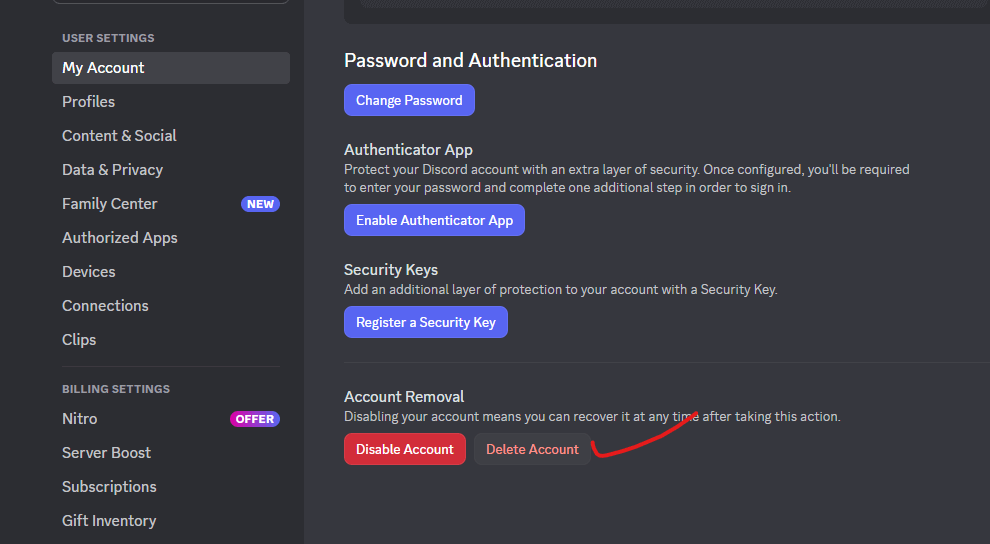
There are two main ways to opt out of Discord: one covers arbitration, and the other involves canceling Nitro. The first helps you retain your legal rights, while the second reduces data-driven ads in the app. You can also opt out of personalized Quest promotions for added privacy.
How to Opt Out of Discord Manually Without Deleting the Account
Discord’s Terms allow you to decline arbitration by sending an email from the address linked to your account. You have to do this within 30 days of either the Terms’ effective date or your account registration, whichever comes later. Here’s a step-by-step process to decline Discord’s arbitration:
- Open your email app using the same address that’s linked to your Discord account.
- Compose a new message to arbitration-opt-out@discord.com with a message such as: “I am writing to opt out of the arbitration clause in Discord’s Terms of Service.”
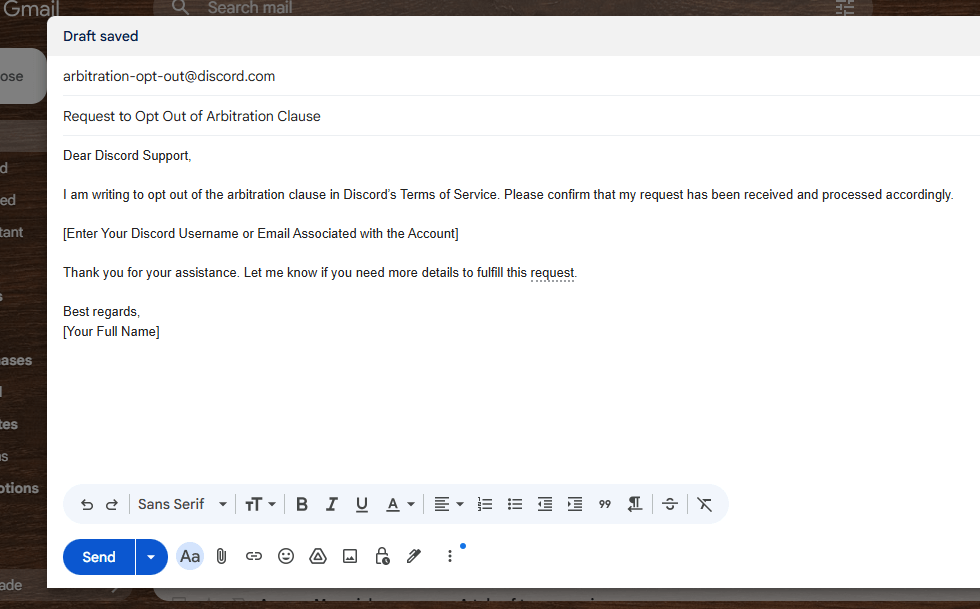
- Send the email and keep a copy for your records, as it serves as proof of your opt-out request.
Arbitration keeps disputes private and limits appeals. Opting out preserves your court options, and you are not penalized for opting out.
If you want to turn off personalized ads and promotions, you can do it within the Discord app. Here’s how it works:
- Open the Discord app and go to User Settings.
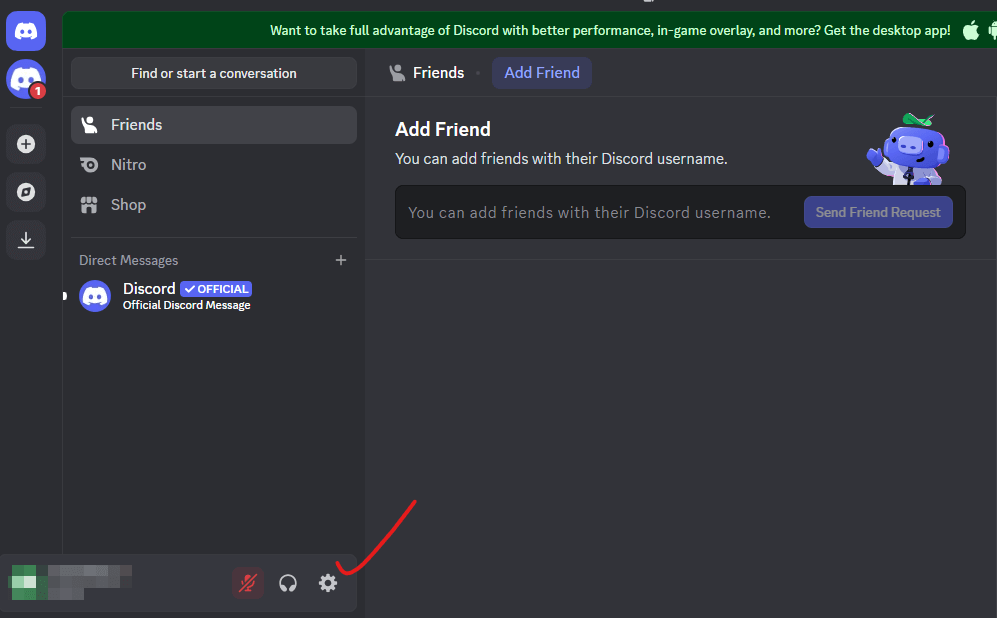
- Click on Data & Privacy.
- Hover over the “How Discord uses your data” section (or a similarly titled option). Turn off options like “Use data to improve Discord” and “In-game rewards (aka Quests)”
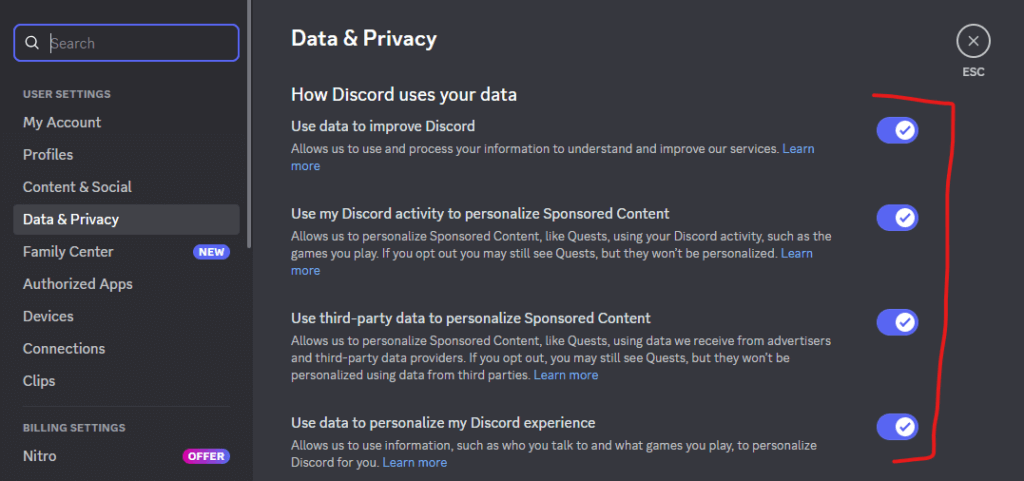
- You can also turn off “Use data to personalize my Discord experience” to limit non-ad personalization. Then, click on “Yes, I’m sure” to confirm your choice.
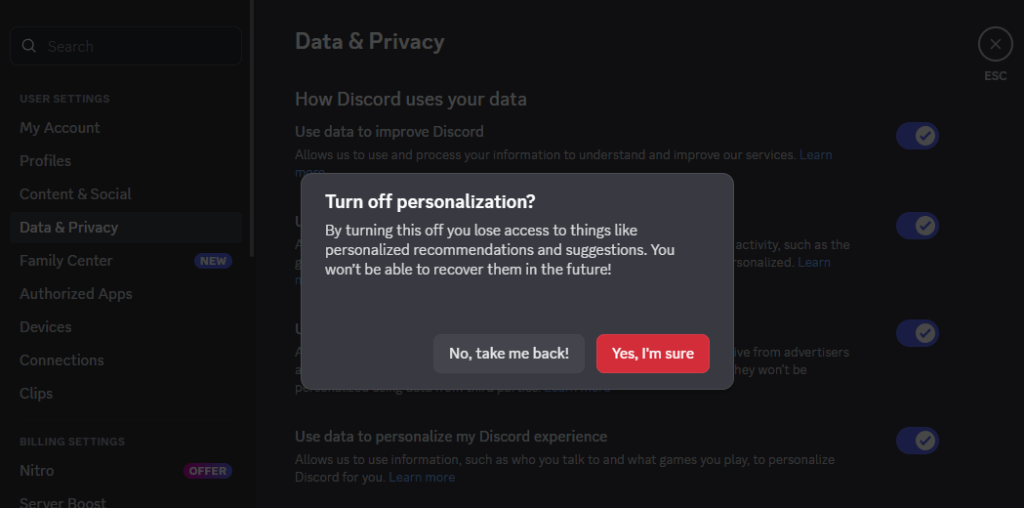
Engagement is optional. You can hide promotions and turn off personalization so Quests aren’t tailored to you. Video Quests are also expanding to mobile, but remain dismissible and completely optional.
Here’s how you can cancel or opt out of a Discord Nitro Subscription:
- Open User Settings and go to Billing.
- Find your active Nitro plan.
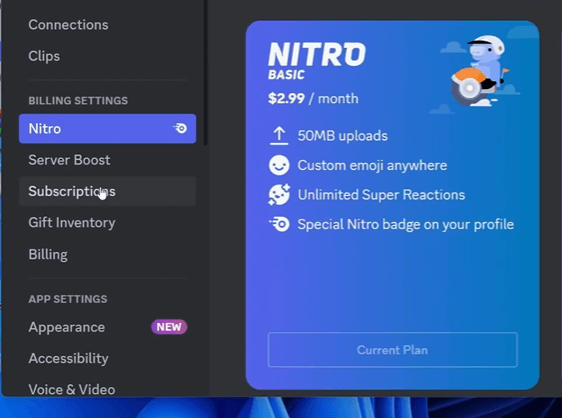
- Click on Cancel and follow the on-screen instructions to complete the process.
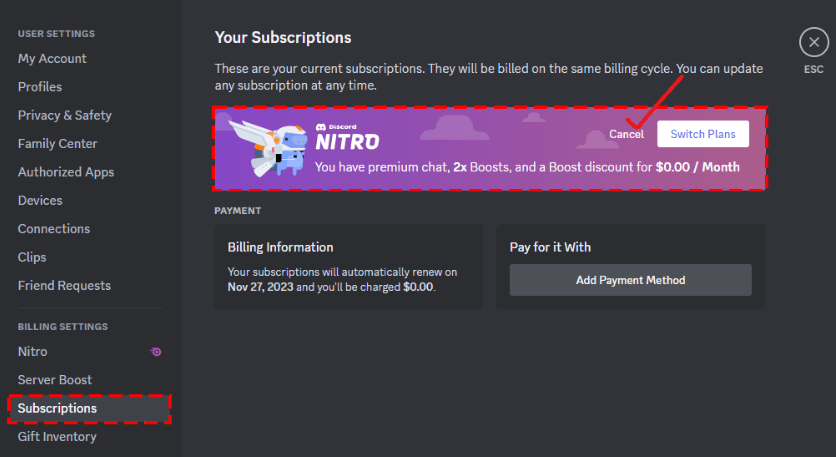
Nitro Subscriptions need to be canceled on the same type of device used for the purchase. For example, mobile purchases should be canceled from your mobile device. To opt out of Discord’s beta experiments, avoid joining public betas, turn off personalization, and decline Quest prompts.
Protect Your Personal Data Across Multiple Platforms
After opting out of Discord, it’s a good idea to further strengthen your privacy. Many platforms, even ones you rarely use, retain identifiers and activity data that fuel ads, recommendations, and contact lists. Privacy365 helps you remove your data across platforms and prevent automatic re-enrollment, saving you time and headaches.
Discord Opt Out Done Right
You’ve completed the three main Discord opt-out steps: you sent the arbitration opt-out email on time to keep your right to take legal action, turned off data personalization for promotions and Quests to stop tailored ads, and canceled Nitro to prevent future charges.
To extend your privacy protection, Privacy365 can submit a single request to stop data sharing across multiple platforms, making the process faster, more thorough, and easier to manage.
Frequently Asked Questions About the Discord Removal Process
Here are some common questions and answers to help you better understand how to opt out of Discord.
Can I Opt Out of Discord’s AI Features?
Yes, you can limit Discord’s AI features by keeping personalization toggles off, reviewing server bot permissions, and avoiding new AI opt-ins. These steps help reduce the data used for targeting and AI-driven recommendations.
Is Discord Traceable by Police?
Yes, Discord can be traced by the police when required. To respond quickly to legal requests, Discord needs specific information that clearly identifies a user’s account. This can include the user’s identification number, username, and email address. Discord can find the exact account in its system and provide information to law enforcement.
Does Opting Out Affect My Ability to Use Discord?
No, opting out does not stop you from using Discord. You can still chat, join servers, and use all free features. Opting out mainly changes how Discord handles your data, billing, and legal rights. Discord says you won’t be punished for opting out of arbitration or turning off personalization. The main difference is more privacy and fewer ads.
What Happens If I Don’t Opt Out of Discord Arbitration?
If you don’t opt out within 30 days, you agree to settle disputes through private arbitration, not court. Arbitration is usually faster, but it limits your right to appeal or join class-action lawsuits. Many users opt out of keeping their right to court cases. After the deadline, you lose this option.
Privacy365 Makes Privacy Your Top Priority
You can opt out of Discord arbitration, cancel Nitro, and turn off Quests by following the steps above. If you have opted out before, you need to do it again under the new Terms to stay opted out. It can feel like a tiring and repetitive process.
With Privacy365, you only need to start once. It helps you manage opt-outs across Discord and many other platforms in one place. Sign up for Privacy365 to remove your personal data in bulk without the extra work.