Thomas Fine
Updated On : Wed, December 17, 2025Opt Out Guides

ClustrMaps can make personal information like home addresses, phone numbers, and family connections easily accessible online. If you want more control over your data, performing a ClustrMaps opt out is the best way to remove your profile from the site and prevent it from showing up in search results.
This guide walks you through the process step by step. You’ll learn how to confirm that your profile has been removed, handle duplicate listings, and reduce the chances of your information reappearing on people search sites. Opting out does not affect public records or your credit.
For added protection, don’t forget to check out our other opt out guides.
ClustrMaps Opt Out: Quick Guide and Estimated Removal Times
Estimated Manual Data Removal Time: 10-15 minutes, depending on how many listings show under your name or address. Expect a few more minutes if you have past addresses or name variations.
Estimated Data Removal Time With Privacy365: 3-5 minutes to start your request, since your information is saved and can be reused for removals on other similar sites.
What You Need to Remove Your Data: Your email address for confirmation, your full name as it appears on the listing, your street address, and the live URL of the profile you want removed. Using a separate privacy-only email is a good option if you don’t want to use your primary account.
What We Know About ClustrMaps
ClustrMaps is a people search site that connects names to locations and adds publicly available information to those records. You can look someone up by name to find an address, or search by address to see who lives there. It’s fast, free, and doesn’t require an account.
Search results show a map pin near the address, estimated rental prices, and links to background details. It feels more personal than other directory sites because it displays exact locations.
ClustrMaps builds profiles using public records such as property records, licenses, voter lists, and commercial data. It follows privacy laws like the California Consumer Privacy Act (CCPA), which gives people the right to opt out of data sharing.
How ClustrMaps Gets Your Information
ClustrMaps gathers information from public documents such as property deeds, assessor records, business filings, and court indexes. Commercial brokers add phone numbers and emails, while old directories and social clues help fill in the gaps.
Since this information is constantly updated, moving or changing addresses can create new profiles over time. That’s why removing your data once isn’t enough. It’s important to check regularly to keep your information private.
Pro tip: Save the confirmation email and link when you delete your data from ClustrMaps. This helps if your information shows up again later.
Why ClustrMaps Removal Helps
Removing your personal details from ClustrMaps reduces your risk, both online and offline. Fewer strangers can link your name to your home, and scammers are less likely to use your address, age, or phone number to seem credible. Over time, you’ll also receive less junk mail.
Opting out of ClustrMaps limits what search engines display about you. When people search your name, outdated or incomplete information often appears first. By removing your profile from this and similar sites, you make it easier to manage any incorrect or misleading information.
If you have a restraining order, having your address visible online can compromise it. While courts share some case information, many agencies protect sensitive details to keep survivors safe.
What Information ClustrMaps Might Show About You
Here is what personal profiles can include:
- Full name, including nicknames or maiden names
- Age, birthdate, and age range
- Current and past addresses
- Map location and property details
- Phone numbers and email addresses
- Known relatives and friends
- Employment history and current job
- Educational background
- Links to social media profiles
- Civil and criminal records
- Property ownership records
- Voter registration details
- Marital status and family information
- Additional online activity or assets
How to Remove Yourself From ClustrMaps
There are two practical ways to opt out of ClustrMaps. You can remove a listing yourself on the site, or you can use Privacy365, which submits the request on your behalf. However, it repeats the process on similar sites without you lifting a finger.
How To Opt Out Of ClustrMaps Manually
Start by removing your profiles using the ClustrMaps opt-out form, and use email support if you need backup. Search for each of your listings, confirm them, and submit a separate removal request for every unique URL. Keep proof of all your submissions, and if any information is still visible later, check in a fresh browser or follow up with the support team directly.
Here’s how to remove yourself from ClustrMaps manually:
1. Head to Clustrmap’s opt-out form. Enter your email address and click on the “Next Step” button.
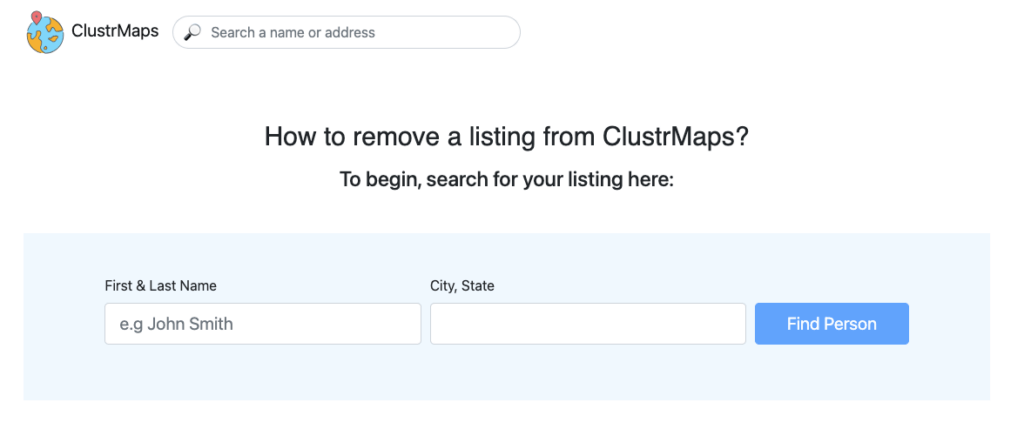
2. Search for your full name along with your city and state.
3. Review the results for profiles that match your information and submit an opt-out request.
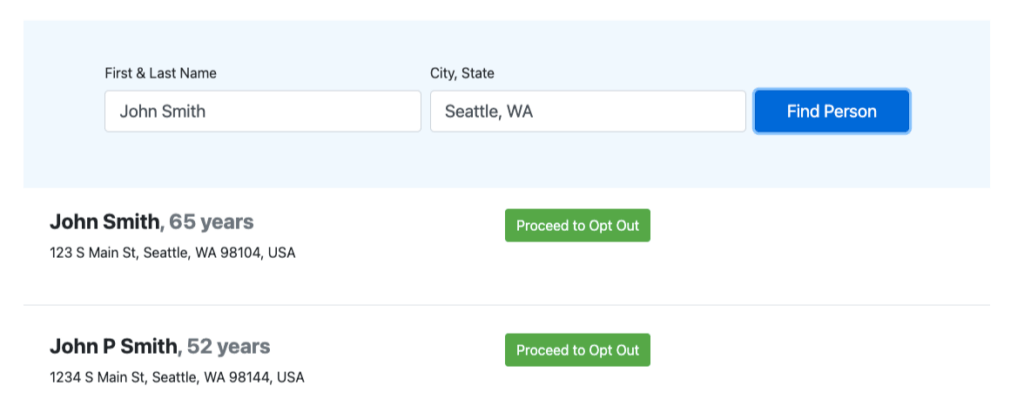
4. Confirm if it’s your record by checking your phone number, addresses, and other information associated with you. Select all available items, so the site removes the entire page rather than leaving partial “breadcrumbs” behind. Press the “Apply” button.
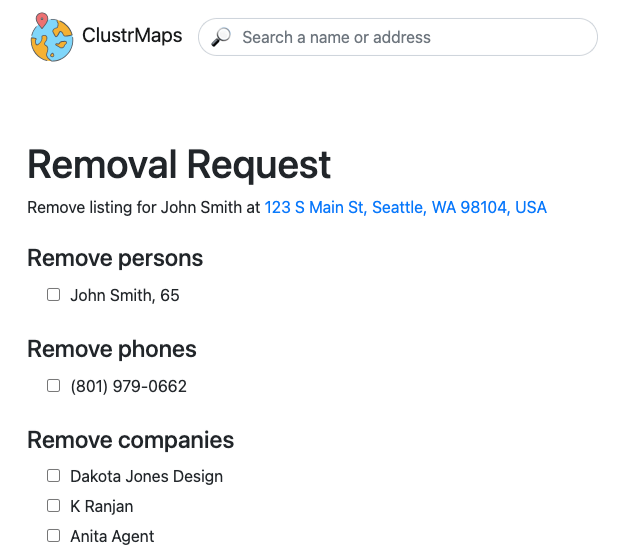
If you have multiple profiles, keep each tab open because you’ll need to submit a separate opt-out for every URL.
5. ClustrMaps will display a success message saying, “As you requested, we have removed your data from the ClustrMaps.com website.”
You can click on the “Remove My Info Now” button to use ClustrMaps’ privacy service. Privacy365, however, offers a more thorough solution by opting you out automatically from multiple services without any extra effort on your part.
If the form doesn’t work or the listing still appears after some time, contact ClustrMaps’ support email. Include your full name, the exact listing URL, and the address shown, and keep your message brief and factual.
Protect Your Data from Services Other Than ClustrMaps
Now that you have removed your information from ClustrMaps, it’s a good idea to protect your privacy on other similar sites. Many sites share the same details, so removing yourself from just one isn’t enough. You can run a free scan to see where your information appears and begin the opt-out process for multiple services.
Why Stop Here? Remove More Data Today
Today, personal data can spread quickly and quietly online. Protecting your information across the web is essential for lasting privacy. Privacy365 makes it easy to remove your details from multiple data broker sites at once, and our simple opt-out guides help you complete the process quickly.
Common Questions About ClustrMaps Opt Out
Here are some common questions about opting out of ClustrMaps:
Why Does ClustrMaps Have My Information?
ClustrMaps collects information from public sources such as records, voter lists, real estate data, and data brokers. It also uses online data from social media, website analytics, and cookies. If these sources link your name to an address or phone number, a profile can be created even if you have never visited the site.
Is ClustrMaps Illegal and Safe?
ClustrMaps is legal because it gathers information from public sources. It collects data from public records, social media, and online directories. ClustrMaps is also safe since it uses security protocols like HTTPS and SSL. However, the main concern isn’t its security, but the privacy risks that come from exposing personal information.
Is ClustrMaps Accurate?
ClustrMaps is a useful starting point, but it isn’t always completely accurate. It collects public data from sources like census records and government agencies, which may be outdated or contain mistakes. Accuracy depends on the type of information and how recent the source is.
For example, one listing might show a current address but the wrong phone number, while another might have an old street name but the correct age. Instead of trying to fix each error, it’s better to remove the page to prevent new mistakes.
Can ClustrMaps Collect My Information Again After Opting Out?
Yes, a new public record can create a fresh entry on ClustrMaps and other data brokers. That’s why quarterly checks are helpful, and why many people use a service to keep sending new requests as records change.
Protecting Your Information With Privacy365
Removing your listing from ClustrMaps helps reduce your online exposure and shows how quickly personal data can spread on the internet. In this guide, you’ve checked your ClustrMaps profile, requested removal, and confirmed that the listing is gone.
Remember, protecting your privacy is an ongoing effort. Staying alert helps keep your information safe online, but you don’t have to track every link or form yourself. Privacy365 can easily handle repeat removals while you focus on living your life.