Evelyn Sanderson
Updated On : Thu, February 5, 2026Opt Out Guides

Are you tired of unsolicited financial offers? Beyond being annoying, receiving preapproved credit cards, insurance mailers, or emails that feel a little too personal can raise safety concerns. At some point, it makes you wonder who’s sharing your banking information and how to make it stop.
ChexSystems is usually the answer. While you can’t stop them from accessing and sharing your information, you can opt out and reduce how much it continues to affect your banking options.
This guide explains how the ChexSystems opt out process works, how your information ends up there, and what steps you can take to protect your financial privacy. For more help with keeping your personal data from appearing on public sites, feel free to explore our other opt-out guides.
What to Know Before You Begin With the ChexSystems Opt Out Process
Estimated Manual Data Removal Time: Opting out of ChexSystems prescreened offers manually usually takes 15-25 minutes. This includes filling out the form, verifying your identity, and submitting your request online or by mail.
Estimated Data Removal Time With Privacy365: With Privacy365, the same process takes about 3-5 minutes. You provide your information once, and we handle the opt-out request for you.
What You Need to Remove Your Data: You’ll need to fill out the form with your full legal name, previous name, current address, email address, home and mobile phone numbers, Social Security number, and date of birth. You’ll also have to provide some documents for proof of identity, such as your Social Security card, driver’s license, and proof of address.
What Is Chexsystems and How Does It Work?
ChexSystems is a consumer reporting agency governed by the federal Fair Credit Reporting Act (FCRA). It collects data on checking and savings account activity and shares it with financial institutions.
Unlike credit bureaus that focus on loans or credit cards, ChexSystems is mainly used by banks and credit unions when reviewing applications for checking and savings accounts. You can request a copy of your consumer report through the ChexSystems website or phone line to see exactly what’s on file. You’re entitled to one free report every 12 months.
ChexSystems also helps create pre-screened lists that may be used for certain credit or insurance offers. These offers are regulated under federal law, and consumers have the right to opt out.
It’s important to understand that ChexSystems doesn’t control all marketing you receive. Its role is limited to how its own data is used.
How Does ChexSystems Collect Information?
ChexSystems gets its information directly from banks and credit unions. When you open and use a checking or savings account, your bank keeps track of how the account is handled. If certain issues come up, the bank may choose to report that information to ChexSystems.
As a specialized consumer reporting agency, ChexSystems collects reports from its member financial institutions and combines them into a single file, similar to a credit report. This file is then used by other banks to help decide whether to approve someone for a new checking or savings account.
ChexSystems may also use certain consumer data to help create prescreened lists. These lists are used by approved companies to send preapproved credit or insurance offers. This process is allowed under federal law, and consumers have the right to opt out if they don’t want their information used this way.
Pro Tip: Don’t have time to remove your information from ChexSystems and similar sites? Privacy365 removes your data from multiple sites at once and does it with minimal effort on your part.
Benefits of ChexSystems Removal
The main benefit of opting out of ChexSystems is privacy. When you opt out, you’re asking ChexSystems to stop using your information for pre-screened credit or insurance offers. This can significantly reduce the number of unsolicited mailers or emails you receive, especially those that feel overly personal or unexpected.
Another benefit is added data protection. By limiting how your information is shared for marketing purposes, you reduce the chances of your personal details being passed around more than necessary. While this doesn’t eliminate all risk, it helps shrink your overall digital footprint and lowers exposure tied to marketing lists.
It’s also important to understand what opting out does not do. A ChexSystems opt out doesn’t remove negative banking records, such as unpaid overdrafts or account closures. Similarly, it doesn’t stop banks from reviewing your file when you apply for a new account. Opting out is strictly about marketing and privacy, not correcting or hiding past banking issues.
What Information Does ChexSystems Track?
ChexSystems focuses on tracking negative banking activity that could signal risk to banks and credit unions when someone applies for a new account. Most of this information can remain on file for up to five years.
The type of information ChexSystems may track includes accounts closed by a bank rather than the customer. These involuntary closures often happen due to repeated overdrafts, misuse of the account, or suspected fraudulent activity. ChexSystems might also record unpaid negative balances, such as overdraft fees or other charges that were never settled.
ChexSystems can also track bounced checks due to insufficient funds, as well as notes related to suspicious or fraudulent behavior. It may also log how often you’ve applied for new bank accounts, which helps banks see patterns.
Along with this activity data, ChexSystems keeps basic personal information, such as your name and address, to correctly identify you and match records to the right person.
How to Remove Yourself From ChexSystems
There are two main ways to opt out of ChexSystems for pre-screened offers: a standard 5-year opt-out or a permanent opt-out. Both options are valid under the FCRA, and the choice depends on how long you want the opt-out to remain in place.
How to Opt Out of ChexSystems Manually
Below are the exact steps you need to follow to remove your name from pre-screened lists for five years or permanently.
Option 1: Online 5-Year Opt Out
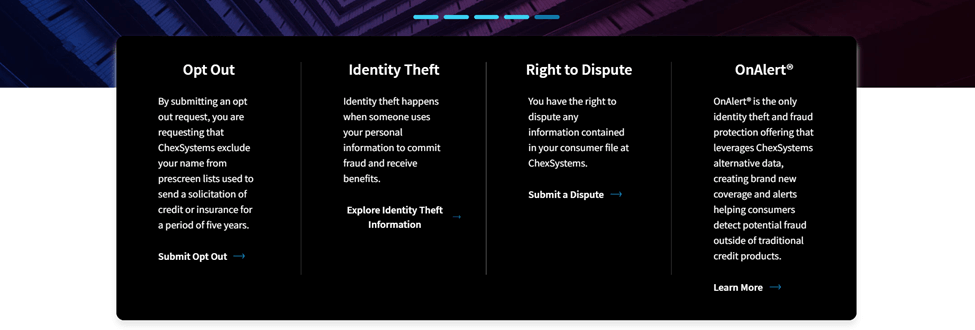
- Visit the ChexSystems website.
- Navigate to the Opt Out section.
- Submit your information.
Option 2: Permanent Opt Out by Mail
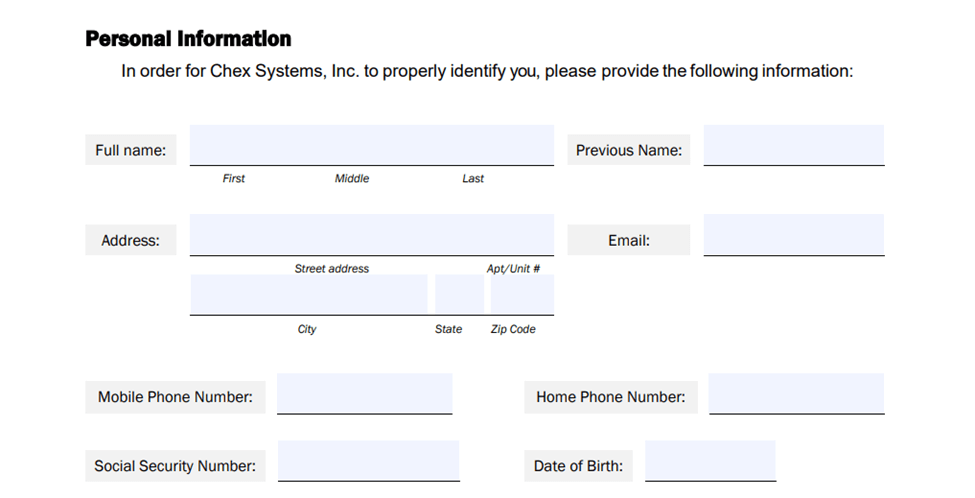
- Download the Permanent Opt Out Election Form from ChexSystems.
- Complete the form with accurate personal details.
- Include copies of required ID documents.
- Review, sign, and date the form.
- Mail the form to the specified address.
How to Delete Your Data From ChexSystems and Other Sites: The Easier Way
Many people who start with a ChexSystems opt out soon realize their information appears in other databases, too. Each platform has its own process and requirements, which is why we have additional guides that explain how to opt out of other services.
However, what starts as one opt-out can quickly turn into a long list of tasks. Privacy365 simplifies this by handling ChexSystems-related opt-out requests as part of a larger privacy solution. You don’t need to search for forms, remember mailing addresses, keep records of when you submitted each request, or follow up to make sure everything was processed correctly.
Instead of visiting multiple sites individually, you submit one request and let Privacy365 handle all opt-outs on your behalf.
Remove Yourself From Multiple Databases at Once With Privacy365
Opting out of ChexSystems gives you more control over how your banking information is used, especially for pre-screened offers. However, it’s important to remember that ChexSystems is only one part of a much larger data-sharing landscape. The same data used for marketing can also be used to make decisions about banking access.
Many people choose to keep going once they see how much information exists beyond a single database. If you don’t want to repeat the same manual process for every service, you can use Privacy365 to submit and track opt-out requests across multiple platforms.
Commonly Asked Questions About ChexSystems
Here are a few questions people ask when thinking about opting out of ChexSystems.
Is ChexSystems Opt Out Legal?
Yes, opting out of ChexSystems is completely legal. Under the Fair Credit Reporting Act (FCRA), consumers have the right to opt out of having their information used for pre-screened credit and insurance offers. Opting out doesn’t break any rules or negatively affect your banking rights.
Does Opting Out Delete My ChexSystems File?
No, opting out doesn’t delete your ChexSystems file or erase your banking history. Your consumer report still exists, and banks can still access it when reviewing applications for new checking or savings accounts. If your goal is to correct or remove specific records, you’ll need to file a dispute or take another separate action.
Can I Still Dispute Errors After Opting Out?
Yes, you can still dispute errors in your ChexSystems report even after opting out. Opting out doesn’t limit your rights to review your report or challenge inaccurate information. If you believe there are mistakes, fraudulent entries, or accounts that don’t belong to you, you can file a dispute, and ChexSystems will investigate those claims within the timeframe set by law.
What if I’m Worried About Identity Theft?
If identity theft is your main concern, placing a security freeze on your ChexSystems file may be a better option than opting out alone. A security freeze restricts access to your report, making it much harder for someone else to open new bank accounts in your name without your permission.
Why Privacy365 Makes ChexSystems Opt Out Easier
The steps involved in opting out of ChexSystems manually aren’t complicated, but they take time and effort. Combine that with having to repeat similar steps for different services, and it starts to feel like more work than it should.
Fortunately, Privacy365 manages multiple opt-outs at once. That means fewer steps for you and less chance of something slipping through the cracks. If you’re serious about protecting your privacy across multiple databases, sign up today.