Thomas Fine
Updated On : Wed, July 16, 2025Opt Out Guides

BeenVerified is a background check site that makes personal information publicly available. While it’s meant to be helpful, it also increases the risk of identity theft, unwanted messages, and potential safety concerns.
The site gets its data from publicly available sources, such as government records, marriage certificates, criminal records, and birth records. This makes everything they do legal, but it also means your personal information is easily accessible to anyone.
Fortunately, there are ways to remove your data from such sites for free. You have two options: you can either opt out of BeenVerified manually or you can use a site like Privacy365, which does everything for you in a matter of minutes.
In this BeenVerified opt out guide, we’ll look at both methods and also explain where BeenVerified gets its data from in detail. Make sure you check out other opt out guides as well if you want to learn how to remove your information from multiple sites at once.
Time & Requirements for the BeenVerified Opt Out Process
Estimated Manual Data Removal Time: 15 minutes. This is just the application process. BeenVerified claims to remove your data within 24 hours, but it can take up to 2 days (or more) in some cases.
Estimated Data Removal Time With Privacy365: 2-3 minutes.
What You Need to Remove Your Data: Your full name, any known aliases, your current and previous addresses, a working email address, and any phone numbers associated with your BeenVerified profile.
What Does BeenVerified Do?
BeenVerified is a data broker service that helps people access public records for a small fee. It offers background checks, including criminal history, and people searches, including professional details, with just basic information like a name, phone number, or email address.
You can use its website or mobile app for iOS and Android. The app also allows you to perform reverse phone lookups and track registered sex offenders.
How Does BeenVerified Get Its Information?
BeenVerified gets its information from public sources such as, court documents, property records, and government databases. The platform also scans social media and other online sources to provide a more complete picture of a person’s background, combining all this data to generate detailed reports.
BeenVerified provides detailed background checks and lots of other useful data, which is why opting out is important to protect yourself from identity theft, scams, and privacy risks.
Why Removing Your Data from BeenVerified Matters
Opting out of BeenVerified can really help protect your privacy and reduce the chances of unwanted exposure. Sites like BeenVerified make your personal info easy to find, which can lead to things like identity theft, stalking, or scams.
If your information is listed on their platform, it can be accessed by millions, including malicious actors. Removing yourself helps you maintain control over what’s shared online and keeps your data out of public databases. Here are some reasons to consider opting out:
- Prevent identity theft and financial fraud.
- Reduce the risk of being targeted by scammers and predatory lenders.
- Minimize the potential for stalking or harassment.
- Protect your sensitive data from being sold to unauthorized parties.
- Reduce your online footprint and keep personal details private.
Pro Tip: If you’re serious about safeguarding your privacy, we recommend using Privacy365 to remove your data from multiple sites, including BeenVerified, in a matter of minutes. With Privacy365, you can rest assured knowing your personal info stays private.
What Information About Me Can Be Found on BeenVerified
BeenVerified collects information from public records, social media, and other online sources to create a detailed profile of people. Some of the information they may have includes:
- Full name, aliases, and date of birth
- Phone numbers, email addresses, and home addresses
- Relatives, associates, and neighbors
- Employment history, education, and job titles
- Social media profiles and usernames
- Criminal and traffic records, bankruptcies, and licenses
How to Remove Yourself From BeenVerified
To remove your personal information from BeenVerified, you can follow the process below or use Privacy365 for quicker removal. Here’s a quick guide on how to delete your personal data from BeenVerified’s search results.
BeenVerified Removal: Manual Process
Here’s how you can remove your information from BeenVerified manually:
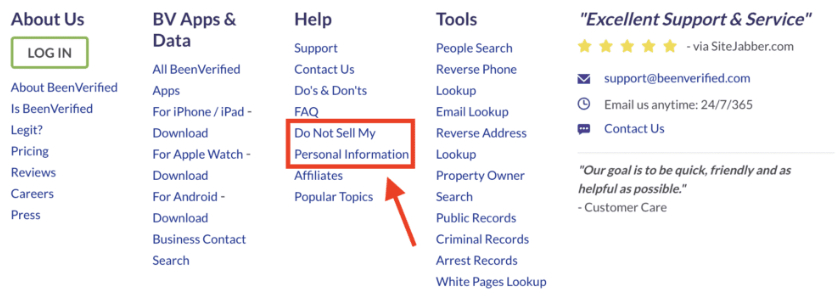
Go to the BeenVerified website and scroll to the bottom of the page. Click on the “Do Not Sell My Personal Information” link in the footer.
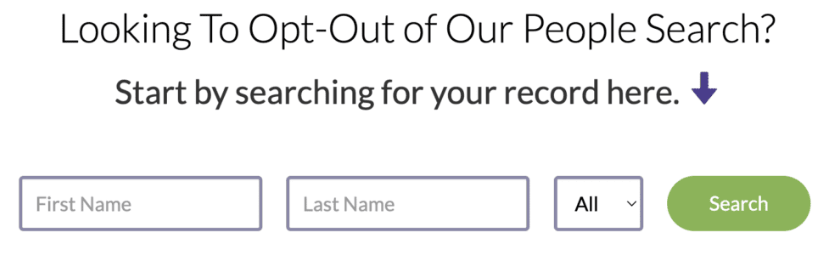
Enter your first and last name in the search bar and click on “Search.” You might find several results that match your name.
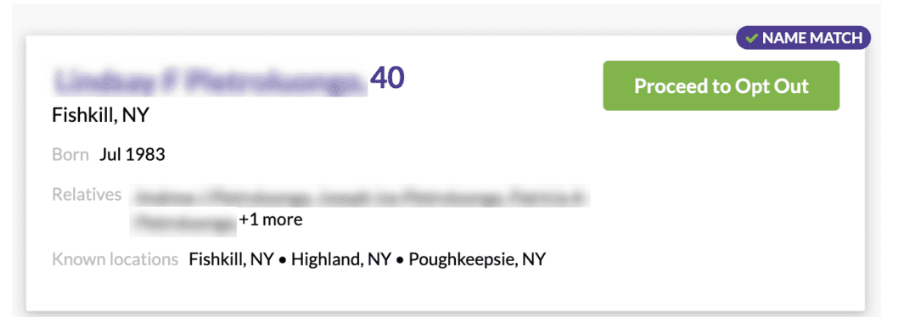
Once you find your profile click on the green “Proceed to Opt Out” button next to your name.
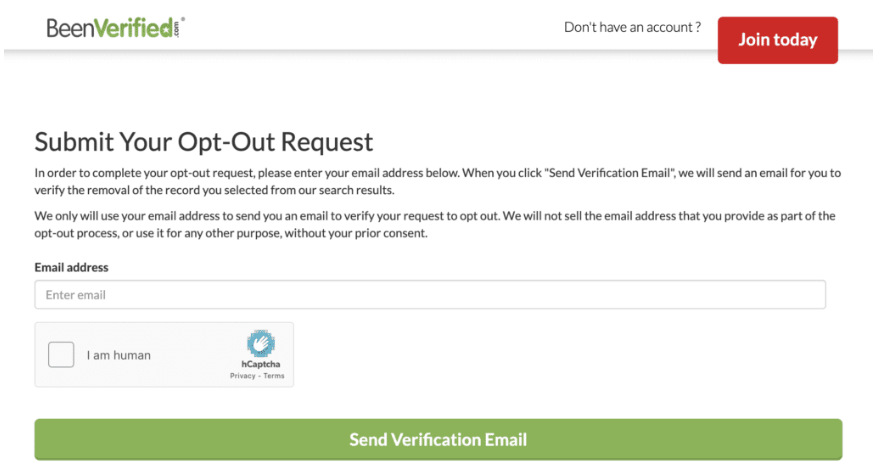
Enter your email address, complete the CAPTCHA, and click on the “Send Verification Email” button. If you have multiple records, repeat this process for each one.
Check your inbox for a verification email from BeenVerified. Click on the green “Verify Opt-Out” button to complete the removal process.
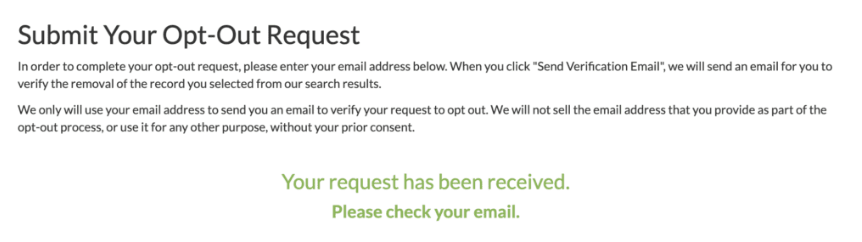
After verifying, you’ll receive a confirmation email. BeenVerified will remove your details from their search results within 24 hours.
How to Delete Your Data from BeenVerified Quickly With Privacy365
Seems easy enough, but what about the other data broker sites out there? Are you going to go through this process 10 more times? What about 20? 50?! Why not let Privacy365 take care of the leg work for you? We can accomplish in minutes what would have taken you days, and it doesn’t stop there.
Opt Out of More Sites Like BeenVerified Today!
Opting out of BeenVerified is an important first step toward protecting your online privacy. However, there’s more work left to be done. Your personal information may still appear on other websites, as data broker companies share details across multiple platforms.
While it’s easy to remove yourself from BeenVerified, doing this for multiple websites takes time. Also, your data can get re-uploaded to these sites.
That’s where Privacy365 comes in. It makes it easy to remove your data from multiple people search sites at once, all in just a few minutes.
FAQs for the BeenVerified Opt Out Process
Will BeenVerified Notify the Person I’m Searching For?
No, BeenVerified does not notify anyone when they are searched. All people searches are private and anonymous. The platform makes sure that no one knows when you’re searching for them.
Do I Need an Account to Opt Out of BeenVerified?
No, you don’t need an account to opt out of BeenVerified. You can complete the removal process without signing up for a membership or subscription plans. Just follow the steps we’ve mentioned in this BeenVerified opt out guide or get in touch with BeenVerified’s customer support team.
Do I Have to Pay to Remove My BeenVerified Record?
No, you do not have to pay to remove your information from BeenVerified. It’s free, and you don’t need to pay or subscribe to any service to opt out. All you have to do is send an opt-out request form.
Is BeenVerified a Legal Service?
Yes, BeenVerified operates legally within U.S. laws that govern access to public records. It follows the rules and makes sure its data is not used for illegal purposes.
The platform operates under the Freedom of Information Act (FOIA), which makes sure certain government records are accessible to the public. However, BeenVerified is not considered a Consumer Reporting Agency (CRA) under the Fair Credit Reporting Act (FCRA).
Is the BeenVerified Opt Out Process Legitimate?
Yes, the BeenVerified opt out process is legitimate. The site allows you to request the removal of your personal data from its database for free. If you don’t want your information on the platform, you can easily and securely have it removed.
We also recommend Privacy365. It can help you remove your personal information from multiple people search sites simultaneously.
Continue Keeping Your Sensitive Information Safe With Privacy365
Privacy365 makes it much easier to opt out of services like BeenVerified, but it doesn’t stop there.
In addition, Privacy365 will continue monitoring these sites to make sure they don’t repost your information when you aren’t looking. It’s like having a private investigator on call, making sure your information isn’t available for anyone and everyone without your expressed permission.