Evelyn Sanderson
Updated On : Fri, June 26, 2026Opt Out Guides

There are thousands of websites out there that share your data. What’s more, these websites aren’t shy about the data they’re tracking either, and they sell it to credit agencies, small businesses, background check companies, and anyone else who’s willing to pay for it.
While there are lots of these companies out there, that doesn’t mean that you have to fall victim to them. And in this guide, our main focus is going to be on CheckPeople.com.
While the platform may be legitimate, that doesn’t mean that you should let them do whatever they want with your information. In fact, it’s quite the opposite, and we’ll help you delete yourself from CheckPeople.
While we help you remove yourself from CheckPeople, that doesn’t mean that it’s the only platform out there. Whether you want to remove yourself from a credit bureau’s third-party tools or try something else, we have your back with more opt out guides.
Quick Facts About the CheckPeople Opt Out Process
Estimated Manual Data Removal Time: To remove your information from CheckPeople, make sure you prepare to spend around 10-15 minutes on your phone or computer. Then, you need to wait another five to seven business days for your information to be fully removed from the system.
Estimated Data Removal Time With Privacy365: Overall, it will take around five to ten minutes to remove your information from CheckPeople with Privacy365.
What You Need to Remove Your Data: To remove your data from CheckPeople.com, you need to provide the site with some information. This information includes your first and last name, email address, and date of birth. You won’t be able to proceed with the CheckPeople opt out process until you provide this information.
What Is CheckPeople? And Why It Matters
CheckPeople.com is a public record search tool that helps users comb through millions of public records in a matter of minutes.
The platform is known for generating full and comprehensive reports that include information about someone’s location, criminal history, phone service provider, and much more. This is why millions of users across the United States use CheckPeople for business, background checks, and general information needs.
Now, this doesn’t mean that you need to leave your information on the platform; quite the contrary. The good news is that CheckPeople is very open about how it uses and shares your data.
What’s more, the platform makes the opt out process hassle-free with links right in the footer of the homepage. The only annoyance is that you’ll need to navigate to your email inbox to continue to process.
Overall, CheckPeople is not as bad as some of the other options out there.
How Does CheckPeople Get Information?
CheckPeople sources its information from a wide variety of resources. More often than not, the information comes from public records. This includes combing through court records, criminal records, and other state records. Typically, these records are sourced through public databases, so it’s information that’s available elsewhere (if you know where to look).
For this reason, CheckPeople’s role is to ensure that finding information is hassle-free; in other words, the point is to provide users with a comprehensive report in one location. Therefore, you don’t have to worry about CheckPeople sourcing your information through shady means or anything like that.
Pro Tip: When you need to remove yourself from CheckPeople, the process is simple; Privacy365 will help you delete yourself from CheckPeople and other similar websites.
Why Opting Out of CheckPeople Is Worth It
Learning how to opt out of CheckPeople is important and worth your time. The fewer sites that hold your information, the better, and CheckPeople isn’t even one of the bad ones out there. Still, it’s important to understand that these sites can sell your information to anyone who comes looking.
Whether it’s a background check company, small business, or someone trying to track you down, the fewer locations to find your information, the better. Therefore, we always find it’s worth it to opt out of CheckPeople and other similar platforms.
Information That CheckPeople Gathers
When it comes to the information that you can find on CheckPeople, ultimately, it varies based on the person. For example, only some people have criminal records, so this information isn’t always available on the platform. On the other hand, other people may have more comprehensive reports because CheckPeople gathers all available public records.
Some examples of records that CheckPeople compiles includes:
- Criminal records
- Civil court records
- Marriage records
- Divorce records
- Some vital records
- Contact information
- Location details
- Social media profiles
- Email addresses
- Information about websites
Overall, CheckPeople sources all available public records associated with someone from numerous sources, so if it’s out there, CheckPeople has it. This is something worth keeping in mind throughout the opt out process.
How to Remove Yourself From CheckPeople
There are a few ways to opt out of CheckPeople. First and foremost, you can manually opt out of the platform. This involves following the proper steps to opt out of the platform based on the guidelines that CheckPeople offers to you.
On the other hand, you could also opt out of CheckPeople via Privacy365. We make the process a breeze, and we help you opt out of several platforms in one shot. We cover both options in detail below.
Opting Out of CheckPeople Manually
If you want to opt out of CheckPeople manually, or the hard way, the good news is that it’s not as difficult as some other platforms.
Unlike some other nefarious data broker platforms, CheckPeople makes the opt-out process hassle-free by making the process clear to every user. All you need to do is navigate to the Privacy Rights page to begin the opt out process. Here, you’ll select “Right to Delete.”
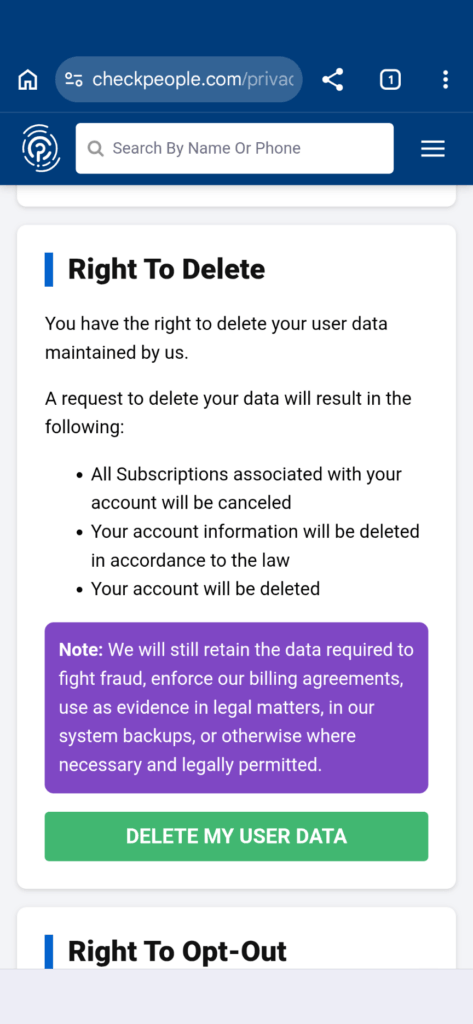
From there, you can follow the steps below, which are straightforward. These steps include:
- Selecting “Opt Out” on the next page.
- Provide your email address and agree to the terms and conditions.
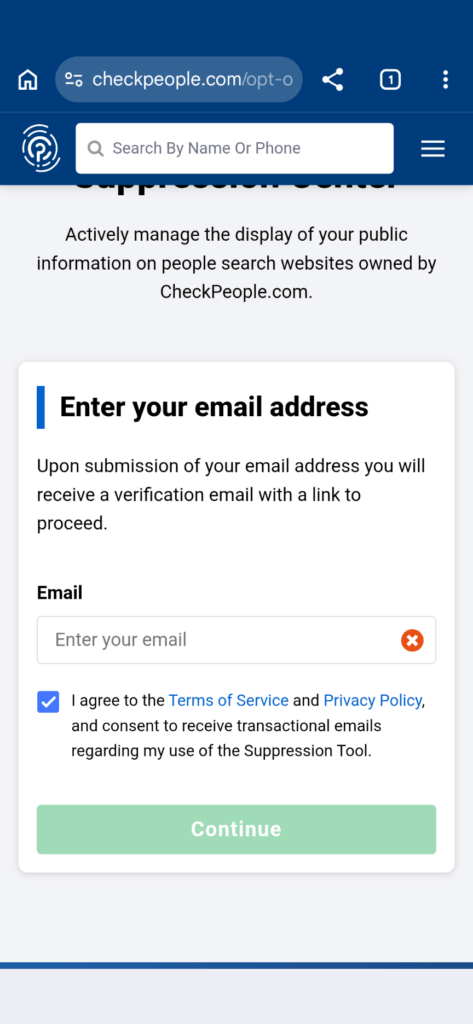
- Navigate to your email inbox and look for the appropriate email.
- Enter your date of birth into the form. Then, enter your first and last name into the form.
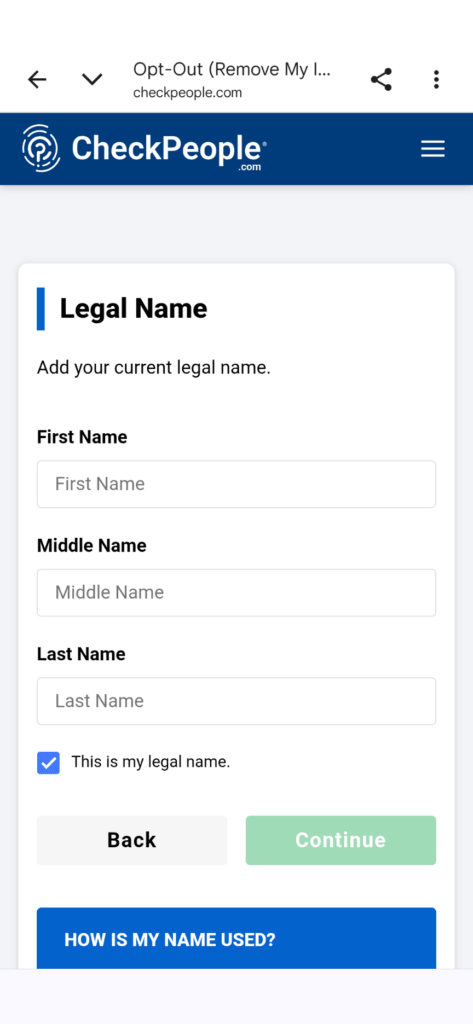
- Last but not least, confirm that you want your information removed.
How to Opt Out of CheckPeople With Privacy365
Opting Out of CheckPeople is easy with Privacy365. All of those steps we mentioned earlier? Well, you can scrap them when you leverage Privacy365; this is because we help you opt out of CheckPeople and other similar platforms in one shot.
So, instead of having to follow the steps for CheckPeople and then following the steps for other platforms, you only have to go through the process one single time. All you need to do is create an account and then follow the steps necessary to opt out of data broker websites.
How To Delete Yourself From More Than Just CheckPeople
CheckPeople is a great place to start, but why stop there? With hundreds of these sites out there, it’s important to ensure that your digital footprint is clear. With Privacy365 you’ll have no problem opting out of all these platforms.
We make opting out of CheckPeople and other sites hassle-free when you fill out our opt out form. Simply provide some information, create an account, and start cleaning up your online data.
The CheckPeople Removal Process
CheckPeople.com is a great platform for those who use it. People use it to run background checks, connect with lost friends/family, and learn more about property or phone numbers. While this is great, it’s not really great for people on the other end, especially if you don’t want someone to have easy access to your information.
Sure, CheckPeople sources its information from legitimate sources that manage your records, but the problem lies in how it’s all kept in one simple place. By removing your information from CheckPeople, you make it a little bit harder for people to find, sell, or leverage your information.
And the best part? CheckPeople is only the beginning, and when you work with Privacy365 we’ll help you clear your online profile from all of these websites.
Frequently Asked Questions About the CheckPeople Opt Out Process
If you have more questions about opting out of CheckPeople, don’t worry, because we have the answers you need below.
How Do I Cancel My Subscription With CheckPeople?
If you have a subscription with CheckPeople, the cancellation process is a breeze. Simply contact support@checkpeople.com or give the company a call via 1-800-267-2122 to remove your information and subscription.
How Much Does CheckPeople Cost per Month?
CheckPeople costs around $44.85 per month. However, there is a free trial period that only costs a few bucks for several days.
Is CheckPeople Legal?
Yes, CheckPeople is legal. It’s a simple platform that combs information from thousands of public databases, so the platform isn’t doing anything illegal.
Opt Out of CheckPeople With Privacy365 Today
Are you ready to complete the CheckPeople opt out process? If so, make sure you follow the steps we covered in this guide to remove yourself from the platform. That said, we always recommend creating an account with Privacy365 for the best results.
We’ll help you remove your information from CheckPeople and hundreds of other data broker platforms.