Dave Moore
Updated On : Thu, August 14, 2025Opt Out Guides

Fast People Search is one of many data aggregation sites that collect and publish personal information scraped from public records. If you’ve ever looked yourself up online and found your phone number, address, or family members listed in one place, Fast People Search was likely involved.
While these services can be useful for reconnecting with people, they also pose serious privacy risks, especially when your details are exposed without consent.
In this guide, we’ll walk you through the process of removing your information from Fast People Search. We’ll cover how the site works, what it collects, and how you can opt out manually and automatically.
Did you find your personal information listed elsewhere? Do you intend to clean up your digital footprint for good? If yes, make sure to take a look at our other data removal guides on the Privacy365 blog.
Quick Facts About Fast People Search Opt Out
- Estimated Manual Data Removal Time: 5 -15 minutes per listing. You may need to search multiple versions of your name or address if there are duplicates.
- Estimated Data Removal Time With Privacy365: 2 minutes or less. Privacy365 automatically finds and removes your listings across Fast People Search and dozens of other sites.
- What You Need to Remove Your Data:
- The URL of your listing (from the Fast People Search search results).
- A valid email address to receive a verification link.
- Access to your inbox to confirm the request.
What We Know About Fast People Search
Fast People Search is a free people lookup service that aggregates public records into a single searchable profile. Unlike some paid background check sites, it allows anyone to search by name, phone number, or address and instantly access a list of matching profiles. Each profile may include full names, birthdates, past and current addresses, known relatives, and more.
Because it scrapes from publicly available databases, Fast People Search doesn’t require user consent to display this information. That makes it a common source of unwanted exposure, especially for people who value their privacy, have been doxxed, or work in sensitive professions.
How Does Fast People Search Get Information?
Fast People Search pulls data from a mix of public sources, including:
- Property ownership and tax records.
- Voter registration rolls.
- Census data.
- Court filings.
- White pages directories.
- Marketing databases.
These records are then linked together to create profiles that appear highly detailed about individuals, even if they’re out of date or contain errors.
Pro Tip: Using Privacy365 saves you from having to track down each of these sources manually. One dashboard removes your data from Fast People Search and dozens of similar sites in a few clicks.
Why You Should Opt Out of Fast People Search
Removing your personal data from Fast People Search reduces the risk of identity theft, spam, stalking, and other forms of data misuse. While it may seem harmless for your address or phone number to be public, this information is often combined with other records across the web and can be weaponized by scammers, data brokers, or malicious actors.
Opting out also gives you more control over your online presence. If you’re a public-facing professional, work in healthcare, education, or law enforcement, or have been through a difficult personal situation, keeping your information private can be essential for safety and peace of mind.
What Information Does Fast People Search Collect?
Fast People Search may include the following data in your public profile:
- Full name, including aliases and maiden names.
- Date of birth and age.
- Current and previous home addresses.
- Phone numbers (landline and mobile).
- Email addresses.
- Relatives and household members.
- Property records.
- Criminal or traffic records (when available).
- Social media profiles (if connected).
Even if you’ve never used the site yourself, Fast People Search may still have created a listing using data from third-party sources.
Fast People Search Removal: How to Delete Your Information
If you intend to wipe out your data from Fast People Search, you can choose from two options. The first one is the standard, manual process of requesting the website to remove your data. And the other option (the smarter one) is to use Privacy365.
Here’s a more detailed, step-by-step process for both options.
How to Opt Out of Fast People Search Manually
Follow these steps to remove your profile manually:
Go to the Fast People Search Opt-Out Page
Start by visiting the official Fast People Search website. Scroll to the bottom of the homepage and look for the “Do Not Sell My Info” link. This link will take you to the opt-out form. Alternatively, you can go directly to the page at: https://www.Fast People Search.com/removal.
Read and Agree to the Terms
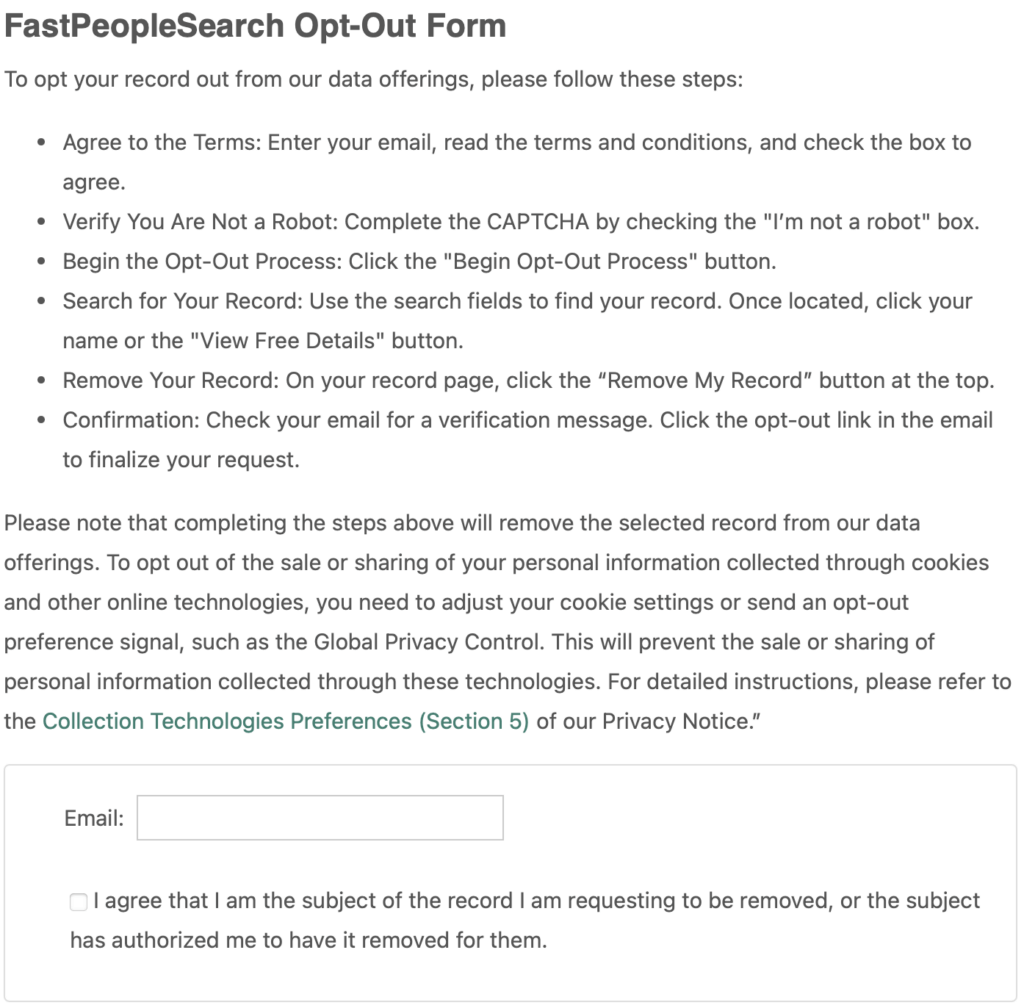
On the opt-out page, you’ll be asked to review the terms and conditions. If you agree, enter a valid email address, complete the CAPTCHA challenge to verify you’re not a bot, and click the Begin Removal Process button to continue.
Search for Your Listing
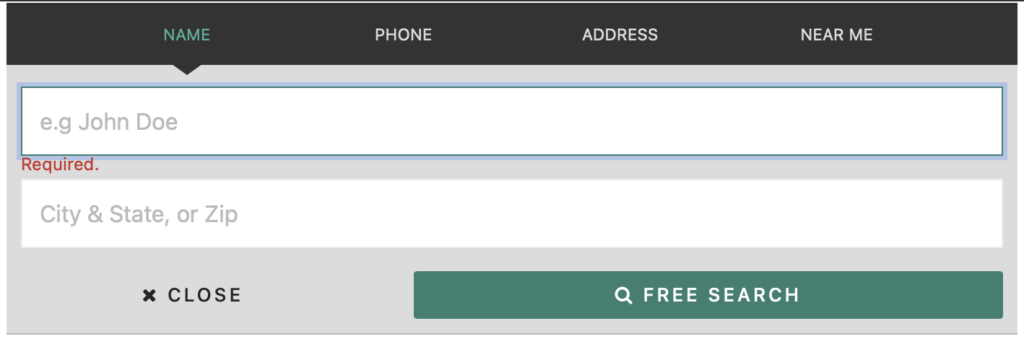
You’ll be redirected to a search screen. Enter your first and last name, along with your state of residence. The search results will show all matching entries. Browse carefully and click on the listing that matches your personal details.
Submit the Request
After verifying that the information is correct, click the Remove My Record button. You’ll be taken to a confirmation screen notifying you that a verification email has been sent to the address you provided earlier.
Open Your Email and Verify Your Request
Go to your inbox and look for a confirmation email from Fast People Search. If you don’t see it in your primary inbox, check your spam or junk folders as well. Open the email and click the verification link inside to finalize your request. It’s a good idea to add Fast People Search to your safe sender list to avoid missing future communications.
Wait for the Update
Fast People Search generally processes removals within 24 to 72 hours. While most requests go through without issue, there are occasional delays. If you haven’t received confirmation or your listing is still visible after several days, reach out to their support team directly at support@Fast People Search.com for assistance.
Repeat if Needed
If you have more than one listing, for example, under a former name, old address, or due to duplicate records, repeat this process for each individual listing. There’s no limit to how many removal requests you can submit, as long as each one points to a unique URL.
Once complete, your data will be removed from public view on Fast People Search, though it may take a few days for changes to reflect across search engines.
Safeguard Your Digital Footprint With Ease
Removing your listing from Fast People Search is a smart first step, but your information is likely still available on dozens of other data broker sites. Sites like TruePeopleSearch, Spokeo, PeopleFinders, and dozens more collect and share similar information, often without notice.
Rather than opting out one by one, you can use Privacy365 to automatically remove your data from these platforms. It’s faster, less frustrating, and helps ensure your private information stays private.
Stop Worrying About Your Data With Privacy365
Privacy365 continuously monitors these sites for new listings, so you don’t have to keep checking. Once you’re signed up, your opt-outs stay current, even if your data reappears later. To get started, sign up and take control of your online privacy in minutes.
Common Questions About Fast People Search Opt Out
Is Fast People Search Legal?
Yes, Fast People Search operates legally by pulling data from public records. However, just because the data is legal to access doesn’t mean you have to leave it public. You have the right to request removal of your information.
How Long Does Fast People Search Opt Out take?
Most requests are processed within 24 to 72 hours after you confirm via email. If your listing is still visible after a few days, you may need to resubmit the request or check for duplicate entries under other names or addresses.
Can Fast People Search Put My Information Back After Opting Out?
Yes, it’s possible. Your data may reappear if it’s re-imported from updated public records. That’s why ongoing monitoring from a service like Privacy365 can be helpful, as it detects and removes new entries as they come up.
Does Fast People Search Show Social Media Accounts?
While it doesn’t always link to social media profiles directly, Fast People Search may display usernames or associated handles gathered from public sources or data brokers.
Simplify Fast People Search Removal With Privacy365
Manually removing your data from Fast People Search takes time, repetition, and constant monitoring, especially if your information keeps resurfacing. Privacy365 eliminates that hassle by automating the opt-out process for you.
With one sign-up, Privacy365 finds your listings across Fast People Search and dozens of other sites, submits removal requests, and keeps monitoring in case new entries show up. No spreadsheets, no follow-ups, no repeating the same process for every site.
If you’re ready to take control of your privacy across the World Wide Web, get started with Privacy365 today.