Dave Moore
Updated On : Wed, April 30, 2025Opt Out Guides

While online information websites can be incredibly useful if you need to perform a quick check on a potential date or look up the history of a property, it can sometimes feel disconcerting to have your information listed on one of these websites.
Information.com is one of the most popular websites that offers people search and address search services, among other types of personal record searches, and you might want to remove your information from this website.
Our full guide tells you everything you need to know about opting out of Information.com’s services. For more information on data removal from websites similar to Information.com, be sure to check out our other data removal and opt-out guides.
A Brief Overview of the Information.com Opt Out
As you start to think about removing your information from a website like Information.com, there are a few essential things you should know:
Estimated Manual Data Removal Time: When using Information.com’s opt-out option, it can take up to 30 minutes to proceed through search results and submit a removal request; it takes five to seven business days after your request for information to be removed.
Estimated Data Removal Time With Privacy365: With Privacy365, your data is always secure, and opt-out requests can be sent in minutes to websites you don’t wish to share your personal information with. This saves you stress and makes the process of removing online data much easier.
What You Need to Remove Your Data: Information needed to remove your data from Information.com includes your first and last name, city, state, and zip code. You might also need your middle name and age range to refine results and select the correct profile for your removal request.
What to Know About Information.com
Information.com is a people search site that specializes in people search, phone number searches, and address searches. You can also look up criminal records and conduct basic background checks using Information.com.
This website compiles information from online records and state-level public records, allowing you easy access to someone’s public records and history with one simple search. Users of Information.com can access complete reports by paying a small one-time fee, or users can invest in the website’s subscription plan of $10 a month.
The number of different searches available on this website and the easy-to-read reports that Information.com produces after a search make this website stand out from other people and background check search websites.
How Does Information.com Get Information?
Information.com pulls all of the information on its website from public records and other online sources. For example, a search on Information.com using your name may locate online records for employers, schools, property records, criminal records, and civil records, among other publicly available information.
Once all of these details have been found and matched to your name, age, and location, Information.com will show you a compiled report of personal details and public record information for the user performing the search to review.
Pro Tip: Opting out of Information.com’s collection of data is incredibly easy with Privacy365. Privacy 365 can also remove your data from similar websites, keeping your personal information totally private.
Why Should You Opt Out of Information.com
In today’s world, it’s common to wonder about which information is available online about you and whether or not it is safe to have your data available through websites like Information.com.
Many people prefer to keep their information private, and opting out of Information.com can help you do just that instead of using a search tool on the Information.com website to find your details.
A person looking for your information will need to go through channels like government public records websites instead. Not only is this a more secure way to find information, but it also ensures that the information someone is finding about you is as accurate as it can be.
Furthermore, if you are concerned about someone accessing your address or if you have reason to be worried about your personal information being leaked online, opting out of Information.com and similar websites can help protect your privacy and your peace of mind.
Personal Details Information.com Collects
Information.com gathers a number of different details when it comes to your personal information. Data that Information.com might list about you includes:
- Your birth date and age
- Your current and previous addresses
- Your phone number and previous phone numbers
- Your email address
- Known relatives, friends, and work associates
- Your employer
- Your educational information, if available
- Criminal record information
- Civil court record information
How to Remove Yourself From Information.com
Removing your data from Information.com doesn’t need to be a challenging process. You have two main methods of completing this: submitting a removal request manually through Information.com directly or utilizing Privacy365’s convenient service. We give you an overview of both of these methods below.
How to Start an Information.com Removal Process Manually
Information.com provides a way for users to manually opt out of its service. We give you a basic overview of these steps below:
1. Navigate to Information.com’s Removal Request page
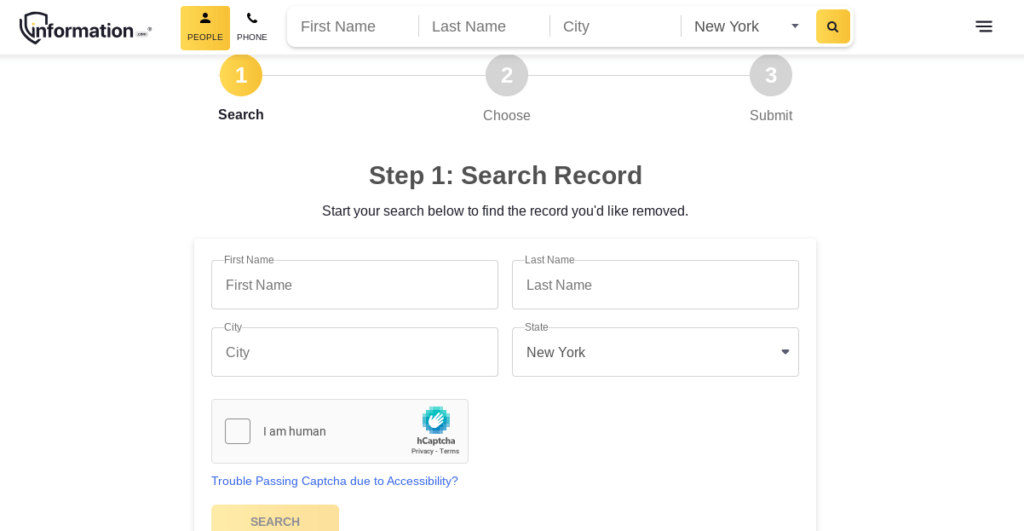
2. Type in your first and last name in addition to your city and state; you may be asked to further narrow your search results with a middle name and age range
3. Browse through the profiles shown by your search until you find your personal profile
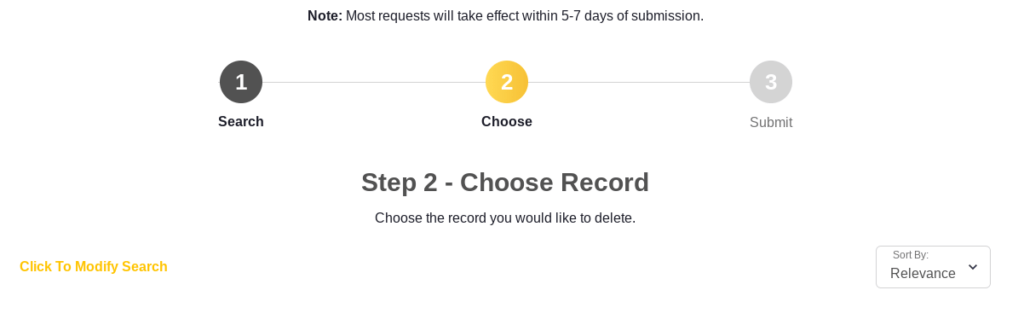
4. Select your profile and follow the on-screen instructions to submit your removal request
Information.com states on its website that removal requests will be completed within five to seven business days after you submit them.
How to Opt Out of Other Sites With Privacy365
When you use Privacy365, you’re able to opt out of dozens of people search websites like Information.com all at the same time. This means that you won’t have to perform the above steps again and again to keep your information safe.
New people search sites like Information.com pop up all the time – Privacy365 helps you keep your personal data off those sites, all with one account.
Pro Tip: Privacy365 is true to its name – we monitor your data 365 days a year to ensure your personal information is always secure and only shared in the places you choose.
FAQ on How to Delete Information.com Profiles
Trying to remove your information from online sources can be confusing, which is why we answer some of the most frequently asked questions about online data removal below.
Are Companies Like Information.com Legal?
Websites like Information.com are perfectly legal, as all of the information shared on these websites comes from sources anyone can access.
Public records are generally available online, and your information may be included on employer websites, school websites, and more. Information.com simply compiles data that is already available from public records and other records, making it easy to access in one place.
Can Employers Use Online Data to Run a Background Check?
Employers cannot use websites like Information.com to run an official background check on you. Not only is this against the terms and services of Information.com and similar websites, but this also violates federal and state-level laws in most places.
Employers must obtain your consent and provide adequate notification before carrying out a background check through an approved and legitimate background check service.
Can Information.com Get My Data Wrong?
Information.com may have incorrect data listed under your name, which can be a perfectly valid reason to submit a removal request. Sometimes, data pulled from internet sources or public records can get mixed up, and this may result in your profile on Information.com having information about places you’ve never lived and jobs you’ve never had, among other things.
Privacy365 can also help with this, as the service monitors where your data is shared, so you can always submit opt-out requests when you see something incorrect or locate your data in a place you don’t wish it to be.
Can My Data Go Back on Information.com After I Opt Out?
Once you’ve opted out of Information.com, you may be worried that your data will appear on the website again at some point in the future.
This typically won’t happen, as any data that is associated with your personal information should automatically be removed from Information.com after your removal request is processed.
However, if your data somehow ends up on Information.com again, you can submit another opt-out request manually or through Privacy365 to get it taken down.
Going Through the Information.com Removal Process Is Simple With Privacy365
When it comes to your online information, it’s perfectly normal to be concerned about which websites have access to your personal details and are showing them with a simple search of your name. Now that you’ve opted out of Information.com, you may be wondering which other websites also show your personal details and public records easily to curious users.
Privacy365 is the best way to get ahead of these searches and send opt-out requests to websites like Information.com that keep records of your personal data. Privacy365’s search tools are constantly on the lookout for your leaked private data, sending multiple opt-out requests at once and helping you understand exactly where your data is being shared online.