Evelyn Sanderson
Updated On : Wed, November 12, 2025Opt Out Guides

SageStream opt-out is the only solution if you want to stop unwanted credit mailers and surprise verification checks. It also stops your name and address from being shared for marketing and quickly cuts down the noise.
This guide explains how to complete the online form, which documents you’ll need, and how long confirmation usually takes. If you prefer not to use the online option, you’ll also find instructions for opting out by phone or mail. We also cover when adding a security freeze is a smart step to prevent new credit checks.
To protect your privacy and remove your personal information from more places, check out our other helpful opt-out guides.
Quick Facts About SageStream Opt Out
Estimated Manual Data Removal Time: 15-20 minutes to submit the online form, and 2-5 business days for processing and confirmation.
Estimated Data Removal Time With Privacy365: 2-3 minutes to start your SageStream opt-out request; we handle the rest and continue working with multiple data brokers.
What You Need to Remove Your Data: Your name, current address, date of birth, social security number, a photo of your ID, and a working email address for state updates and confirmation.
What Is SageStream?
SageStream is a consumer reporting agency and credit bureau, now part of LexisNexis Risk Solutions. It compiles information to produce credit reports used by lenders, insurers, and other businesses for prescreened offers and risk decisions.
The agency also runs an opt-out program and a separate security freeze process for people who want to limit how their information can be used. The company provides an online opt-out form, a phone line, and mail-in options, which we look at below.
How Does SageStream Get Information?
Regulated by the Fair Credit Reporting Act (FCRA), SageStream gathers data from multiple sources. These include application data shared by companies you interact with (financiers, credit card issuers, etc), public records, and other compliant feeds.
That information supports prescreened credit or insurance offers and risk evaluation. If you don’t want to be included on lists for firm offers, the opt-out process removes your name and address from those lists.
Pro Tip: With Privacy365.com, you can quickly remove your information from SageStream and other data brokers at the same time.
Why Learn How to Delete Your Data From SageStream?
Opting out of SageStream removes your data from the company’s prescreened marketing lists. This stops companies from sending unsolicited credit or insurance offers. It also reduces junk mail and unwanted calls.
Opting out also limits how much your profile is shared. This lowers the risk of misuse or exposure in data breaches. You can still apply for credit or insurance anytime. Opting out only stops automatic marketing offers and provides privacy without blocking your financial choices.
What Information Does SageStream Collect?
Here’s the type of data SageStream may have on you:
- Identifiers such as name, addresses, and date of birth
- Contact details tied to accounts or applications
- File activity relevant to prescreened lists
- Information needed to verify identity when you request removals or freezes
You can request your consumer report and dispute inaccuracies with SageStream at any time.
How to Remove Yourself From SageStream (Opt Out Methods)
There are two main ways to opt out of SageStream: online, by mail, or by phone. Processing usually takes a few business days, and you will receive confirmation by email if one is provided.
How to Opt Out of SageStream Manually
Here’s a clear step-by-step process to help you remove your data and protect your credit details from SageStream.
1. Go to the official SageStream Opt-Out/Opt-In page.
2. Look for the “Opt-Out Election Form,” open it, and select “opt-out permanently.”
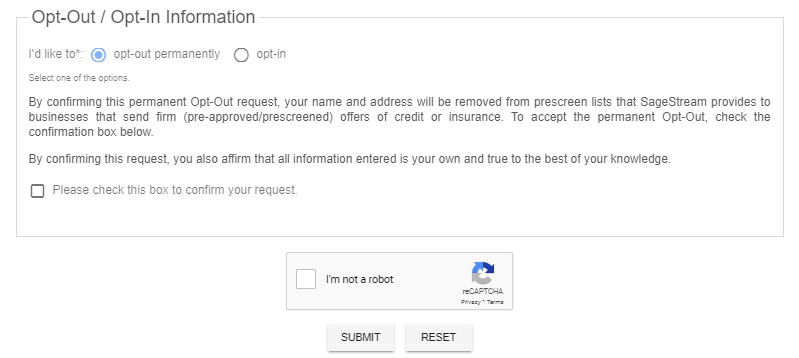
3. Enter your full name, current address, and any prior addresses the form requests. Add your date of birth and, if you’re comfortable, your SSN to help match your file. Complete the CAPTCHA.
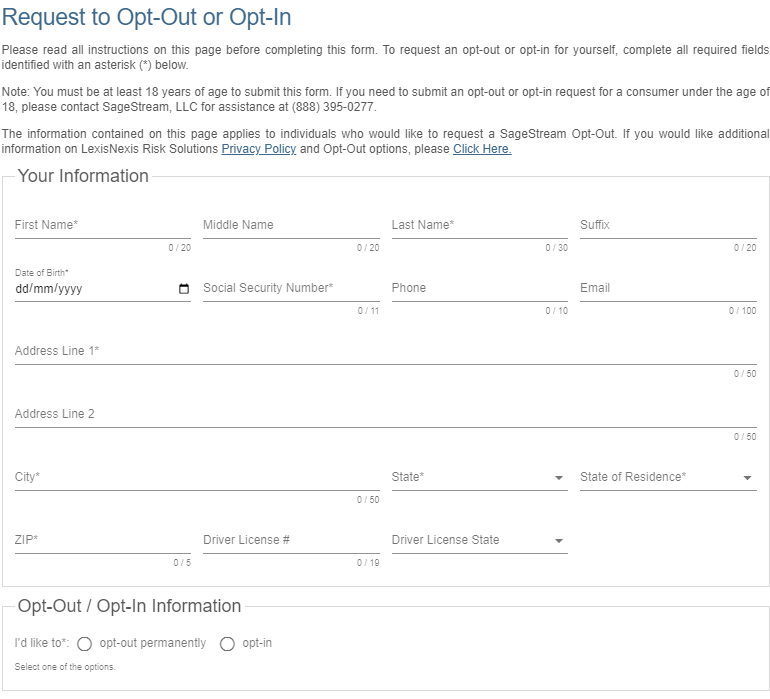
4. Upload identity documents if required (for example, a government ID and a recent utility bill).
5. Submit, then save or print the confirmation page. Processing commonly takes 48 hours to five business days.
You can also remove yourself from SageStream marketing lists used for credit, insurance, and similar offers. Here’s how you can opt out of SageStream permanently by phone or email.
- Call (888) 395-0277 and request to opt out of SageStream. Have your full name, address, and date of birth ready (their team can guide you through the next steps).
- Send a signed request with your full name, current address, date of birth, and contact details.
- Include a copy of a government-issued ID and a recent utility bill for verification.
- Mail to: SageStream, LLC Consumer Office, P.O. Box 503793, San Diego, CA 92150.
You should receive an email or a mailed confirmation once processing is completed. Remember, removing yourself from prescreened lists does not affect your ability to apply for credit or insurance later.
Mark your calendar to check again in a few weeks. If you still receive prescreened mailers that appear to come from SageStream, contact support and reference your confirmation. You can also add a SageStream freeze to prevent new credit from being opened using your report.
Done With SageStream Removal? Here’s Your Next Move
If you see errors in your consumer file, use the dispute channel to request corrections or deletions. Request your consumer report, review it for accuracy, and then dispute any items you believe are wrong or incomplete. Keep copies of your submissions and any confirmations for your records.
Once you’re done with SageStream, it’s a good idea to keep going. Other companies may hold similar data, and each one may have its own opt-out process. Privacy365 can help you continue reducing your exposure and increasing your privacy in a way that’s much faster than opting out manually.
Why Stop Here? Remove More Data From Everywhere
You’ve seen how opting out of SageStream works and how it requires consistent effort. That’s why it’s a good idea to address the rest of your digital footprint across multiple databases. Privacy365 makes this easy by handling these requests in batches, saving you time and reducing unwanted mail.
Frequently Asked Questions About SageStream Opt Out
Here are answers to some common questions about the SageStream opt-out process:
Does Freezing LexisNexis Also Freeze SageStream?
Freezing LexisNexis also freezes SageStream because the former is the parent company. A security freeze stops both LexisNexis Risk Solutions and SageStream from sharing your reports or credit score. They cannot share this information without your permission.
Will Opting Out Hurt My Chances of Getting Credit or Insurance?
Opting out will not hurt your chances of getting credit or insurance. When you opt out, you are simply taken off prescreened marketing lists so that you will receive fewer unsolicited offers. However, this does not prevent you from applying for credit or insurance whenever you choose. Your applications will still be evaluated normally, and you can apply at any time without any restrictions.
Is the “Permanent” Option Really Permanent in the SageStream Opt Out Process?
The permanent selection removes you from prescreened lists on an ongoing basis. That said, new data can still flow into systems over time. That’s why it’s important to keep your confirmation and monitor for any unwanted mailers that may show up again.
How Do I Unfreeze or Temporarily Lift SageStream Freeze?
Go to the same official SageStream freeze portal you used to place the freeze. Follow the prompts to lift it temporarily or remove it entirely. Keep your confirmation details handy so the system can verify your identity quickly.
Will Opting Out of SageStream Stop Every Unsolicited Offer I Get?
It will stop offers that originate from the prescreened lists covered by SageStream. You might still receive offers from other sources, so it’s a good idea to repeat the process with other firms and add a freeze for stronger protection.
Opt Out of SageStream and Other Similar Sites Today
Opting out of SageStream helps protect your privacy, reduce unwanted credit offers, and limit data sharing. The process is straightforward: simply complete the SageStream opt-out form, provide the required information, and submit it.
Adding a security freeze provides extra protection against unauthorized credit checks. It won’t prevent you from applying for credit or insurance, but it gives you greater control over your personal data. Once you’ve opted out of SageStream, you may want to opt out of other data brokers to improve your privacy further.
If you prefer not to handle these steps yourself, Privacy365 can do the work for you. It submits opt-out requests on your behalf and monitors your information to make sure it doesn’t reappear on lists. Sign up for Privacy365 to manage removals across multiple services at once.