Evelyn Sanderson
Updated On : Thu, May 7, 2026Opt Out Guides

SmartBackgroundChecks is a people search platform that shares public information with its users. While this may sound harmless, if your information is being collected and sold by SmartBackgroundChecks, this makes it easier for scammers, spam callers, identity thieves, and telemarketers to get their hands on your information.
For these reasons, it’s a good idea to opt out of the platform entirely, and that’s what Privacy365 is here to help you do.
In this guide, we take you through the SmartBackgroundChecks opt out process. We cover the steps to remove your information on the platform, and we also cover the steps to remove your data from SmartBackgroundChecks via our site.
And the best part? We can help you remove all of your data from SmartBackgroundChecks and offer opt out guides for similar sites in one place and without the hassle.
Quick Summary of the SmartBackgroundChecks Removal Process
Estimated Manual Data Removal Time: SmartBackgroundChecks gives you a bit of the runaround when it comes to removing your public records; you need to navigate through the process, give them your email, and then run a search for your records. Overall, this can take around 20 to 30 minutes.
Estimated Data Removal Time With Privacy365: For the best SmartBackgroundChecks removal results, Privacy365 is the fastest option. Your information can be removed from SmartBackgroundChecks in around five to ten minutes.
What You Need to Remove Your Data: To remove your information from SmartBackgroundChecks, you’ll need to provide your email for verification purposes. From there, you’ll need your name, phone number, or address to begin the process.
What Exactly Is SmartBackgroundChecks?
SmartBackgroundChecks is a comprehensive person search platform. Its purpose is to help individuals and companies find public records that are available for people.
While it has ‘background check’ in the name, that doesn’t always mean that it’s used in this way. In fact, it’s more of a general person search engine, so it’s not a tool that’s reserved for major companies.
Anyone can use SmartBackgroundChecks to find information about a person, and this includes phone numbers, addresses, email addresses, and much more. SmartBackgroundChecks also allows you to search for information using a phone number, address, or full name.
How Does SmartBackgroundChecks Get Information?
SmartBackgroundChecks sources its information from public resources. These include court databases, websites, and information provided by third-party data brokers. The information that SmartBackgroundChecks sources is legal and legitimate.
Pro Tip: While your data is up for grabs on SmartBackgroundChecks because it’s available to the public, that doesn’t mean you have to make it easy. With Privacy365, we can help you remove your information from this site and other platforms.
Why Should You Opt Out of SmartBackgroundChecks Today
Learning how to delete your information on SmartBackgroundChecks is important for a plethora of reasons.
First and foremost, SmartBackgroundChecks shares your information with everyone, and this includes people who want to use it for the wrong reasons. For example, if a scammer wants to steal your identity, they can find a lot of the information necessary to do so with SmartBackgroundChecks if they have your name, phone number, or address.
That said, removing your information from SmartBackgroundChecks will also help with telemarketers and other types of phone spam. So, you may get less calls from “Spam Likely” by removing your information from SmartBackgroundChecks.
It’s also just a good idea for your cybersecurity purposes to remove your information from SmartBackgroundChecks.
What Information Does SmartBackgroundChecks Gather?
SmartBackgroundChecks can gather any information that’s available to the public. Not only does this include public records held by state and local databases, but it also extends to websites, phone records, and much more.
As a brief overview, we cover all types of information SmartBackgroundChecks houses below.
- Contact information, like phone numbers and email addresses
- Location information
- Details about someone’s friends and relatives
- Information on websites, social media platforms, and dating platforms
- Civil and criminal court records
- Vital records that are available to the public (varies based on the state)
Depending on the person, you may find more, or less, information about someone. You can find this information using locations, phone numbers, and names.
How to Remove Yourself from SmartBackgroundChecks
There are two ways that you can opt out of SmartBackgroundChecks. For the simplest option, you can work with Privacy365. However, you can also manually remove yourself from the platform.
To make the process a breeze, we cover the steps to remove yourself from SmartBackgroundChecks below.
How to Remove Yourself from SmartBackgroundChecks with Privacy365
You can remove yourself from SmartBackgroundChecks with a little help from Privacy365. All you need to remove your information from the platform is your first and last name and address.
Creating an account is simple, and the best part is that we’ll help you remove your information from every data broker site like SmartBackgroundChecks. For these reasons, we always recommend starting with Privacy365 first.
How to Opt Out of SmartBackgroundChecks the Hard Way
If you want to opt out of SmartBackgroundChecks by using the platform, get ready for a little bit of legwork. To streamline the process as best we can, we cover the steps to opt out of SmartBackgroundChecks below. We also include screenshots for reference.
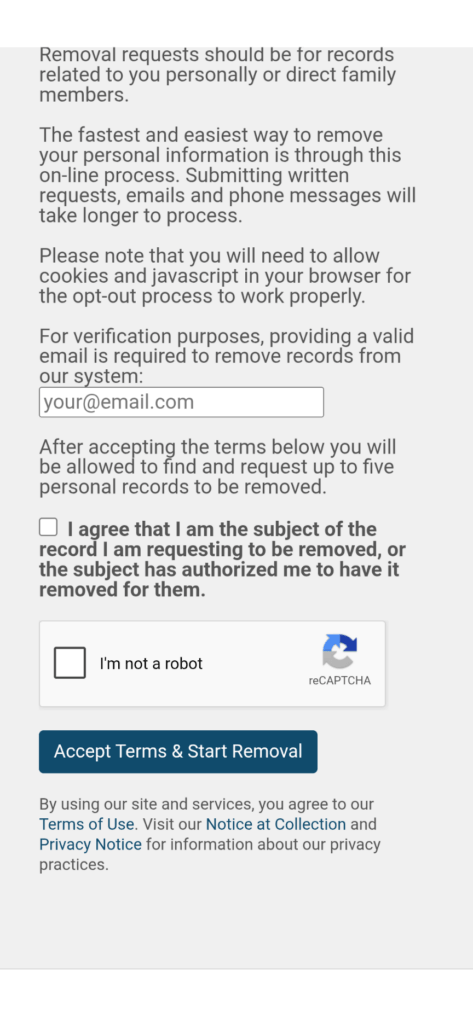
1. Navigate to SmartBackgroundChecks’ opt out page and provide your email address for verification.
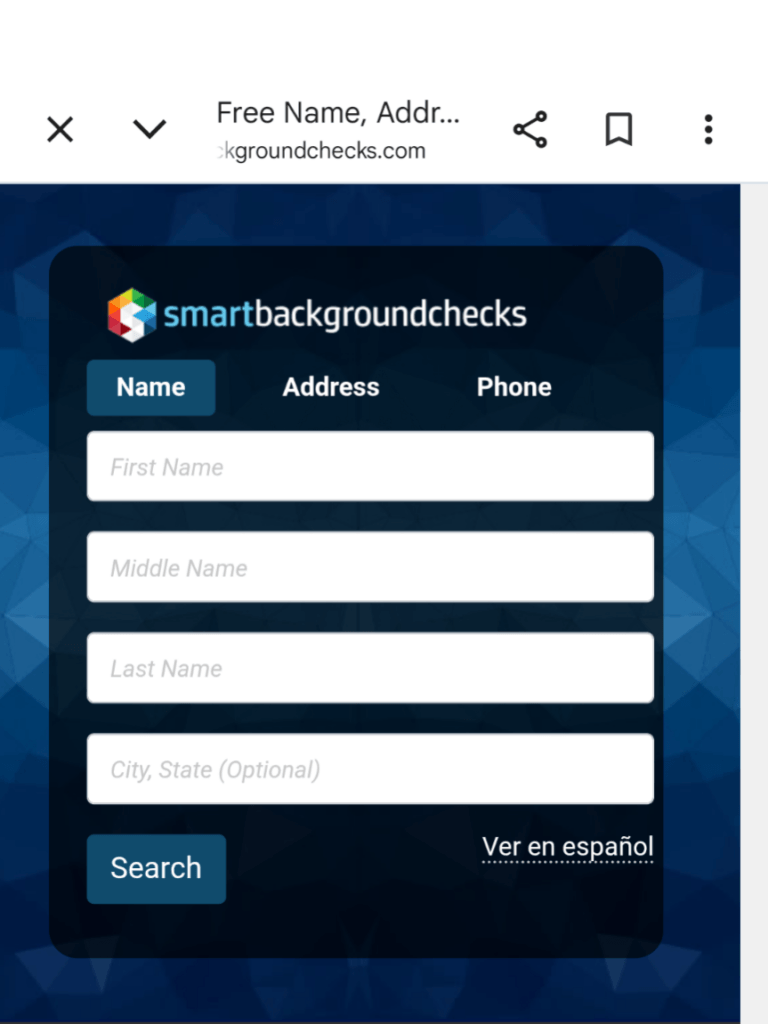
2. Navigate to the platform’s people search tools. Once you provide your email address, you’ll end up at a page that guides you on how to remove your public records once you run a search on yourself.
3. Finally, you can enter your information and begin the search process. You can enter your first and last name, phone number, or address into the search tool.
4. Once the results load, you can begin to remove your information. It will be a highlighted button.
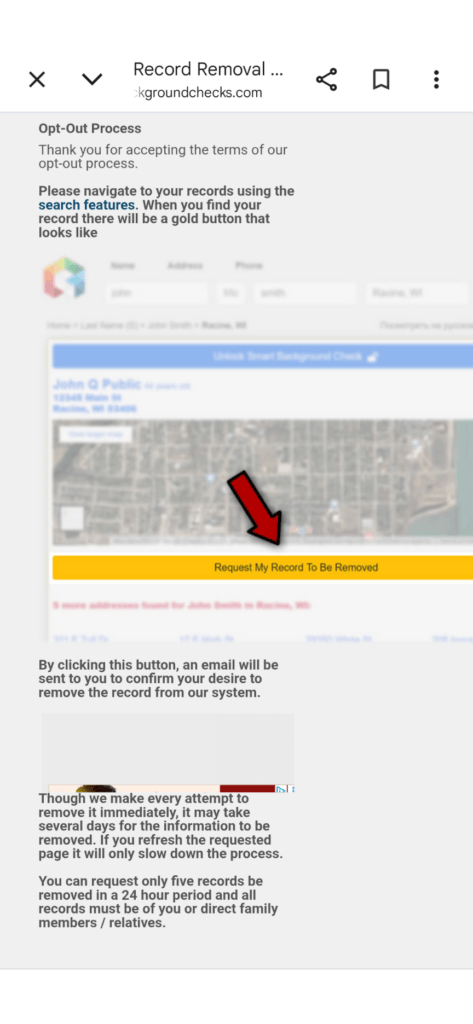
5. Follow the quick opt out steps provided by the website.
The SmartBackgroundChecks Opt Out Process Is Just the Beginning
Opting out of SmartBackgroundChecks is only the tip of the iceberg. Unfortunately, it’s only one person search website, and you’ll find that there are hundreds of others online. As a result of this, it can be time-consuming and a hassle to remove yourself from SmartBackgroundChecks and other websites manually.
Thankfully, when you create an account with Privacy365 we’ll make it our mission to help you remove your information from every single site that has it.
Should You Delete Your Information From SmartBackgroundChecks?
Opting out of SmartBackgroundChecks, and other sites like it, has never been more important. These sites have your information, and they’ll gladly sell it to people or share it with anyone who comes looking for it. This can be a scammer, telemarketer, or even someone trying to steal your identity.
The good news is that, at the end of the day, opting out of SmartBackgroundChecks has never been easier. With Privacy365, we’ll help you remove your information from all of these sites. Plus, you can get it done in one single place. Therefore, you don’t have to waste time and money by jumping around to different websites manually.
Commonly Asked Questions About the SmartBackgroundChecks Opt Out Process
Do you have more questions about the SmartBackgroundChecks’ opt out process? If so, stick around to find answers to your most common questions below.
Is SmartBackgroundChecks Legal?
Yes, SmartBackgroundChecks is legal. The information is sourced from legitimate public resources, and as long as they comply with your request to remove your information, they’re not doing anything wrong.
How Many Platforms Like SmartBackgroundChecks Are There?
There are hundreds of platforms like SmartBackgroundChecks. Many of them are legal, and many of them will gladly share your data with anyone who comes looking for it. This is why we recommend using Privacy365 to remove your data from each of these platforms methodically.
How Much Does it Cost to Remove Your Information from SmartBackgroundChecks?
It doesn’t cost you anything to remove your information from SmartBackgroundChecks manually. However, SmartBackgroundChecks is only one website that stores your public information, and removing it from every one of them will cost you a lot of time.
For these reasons, spending a few bucks on a reliable platform that will help you remove your information from all of these sites at once is the best option.
How to Delete Your Information from SmartBackgroundChecks with Privacy365
SmartBackgroundChecks may be a legitimate platform that provides public information about you and others to individuals and businesses, but that doesn’t mean you need to let them. When sites like SmartBackgroundChecks sell your information to the highest bidder, you can end up in a world of trouble or drowning in spam calls from telemarketers.
The good news is that you can manually opt out of the platform by following the steps we covered in this guide. However, we always recommend creating an account with Privacy365 to remove your information from SmartBackgroundChecks and other similar platforms in one shot.