Thomas Fine
Updated On : Fri, April 24, 2026Opt Out Guides

US Search is a comprehensive public records search tool that data brokers leverage to sell, share, and use your data. Like many other similar platforms, everything US Search does is legal, so it’s up to you to protect and lock down your data. The good news? You don’t have to do it alone, and we have your back in this comprehensive US Search opt out guide.
Opting out of US Search is only the first step in cleansing your online data. We recommend checking out all of our opt out guides to determine which sites you need to focus on opting out of. Read on to learn more about the US Search opt out process.
A Quick Look at the US Search Opt Out Process
Estimated Manual Data Removal Time: Depending on how fast you find US Search, the opt out process may take around 10 minutes or as long as 30. Why? Because the site makes it hard to remove your information, and you may even end up in the wrong part of the site.
Estimated Data Removal Time With Privacy365: If you work with Privacy365, you can expect to have your information removed from US Search in as little as five to ten minutes.
What You Need to Remove Your Data: Information needed to remove your data includes your first and last name, email address, and potentially location information.
US Search Explained
US Search is an online person search site that shares and sells your personal data. It’s one of hundreds of these platforms, and it’s been around for a long time, since 1998. The platform provides users with access to user data tools that allow them to explore their public records.
US Search also offers tools that help you learn more about other people’s public records. The tool enables you to search for public records via first and last name, phone number, and address, so there are plenty of ways to leverage it.
Unfortunately, this makes it easy for anyone to leverage the tool, which is why it’s important to remove yourself from US Search. It’s also important to note that US Search is no longer just US Search. It was added into the PeopleConnect umbrella of services, so you may want to do a deep dive into each one before you begin the US Search opt out process.
How US Search Gets Its Information
How US Search gets its information varies, but it sources its information from public resources. In other words, anything that’s available to the public is something that US Search can leverage to find information about someone.Some common information sourcing records include:
- Crawling through websites.
- Checking court records for civil and criminal court cases.
- Scanning vital records databases that may include records about birth, death, and marriage.
- Property sites, like Zillow, along with records from the county clerk and other public offices.
- Tax information from the tax assessor’s office.
- Phone records found online or in archived Yellow Pages.
As you can see, US Search sources images from lots of resources. What’s more, all of these sources are completely legal, so it’s up to you to prevent US Search from sharing your information.
Pro Tip: Tired of sites and organizations like US Search harvesting and selling your data? If so, Privacy365 has your back, and we can help you opt out of these sites in one go.
The Benefits of Completing the US Search Opt Out Process
Sure, it’s a hassle to have your information available to the public online, but is it really that bad? The bad news is it’s probably worse than you think; learning how to delete yourself from US Search is a great way to start cleaning up your online presence.
In fact, by opting out of US Search, you can prevent scammers and identity thieves from stealing or sharing your personal information. Not only that, but you can prevent telemarketers from blasting your phone with spam calls, texts, and more.
Of course, having your information out there for less people to find tends to be healthy for your online presence in general. After all, this makes it harder for hackers, scammers, and others to steal and share your information.
All the Information That US Search Collects
When it comes to the information that you can find on US Search, you’ll find that it includes anything that’s available to the public. For this reason, users can find all available public records.
These records include:
- Criminal court records.
- Civil court records.
- Many vital records, like marriage, birth, and death records.
- Information about addresses. Details about phone numbers.
- The location of people, including friends and relatives.
Aside from these public records, you can also find other types of information. For example, you can find websites, social media accounts, dating profiles, and other parts of someone’s digital footprint. If this sounds like too much, make sure you act fast and go through the US Search opt out process.
How to Remove Yourself From US Search
If you want to remove yourself from US Search, you have a handful of options. That said, the best way to get the job done is with Privacy365. We make the process a breeze, and we’ll help you remove your information from US Search and other similar sites in one go.
Still, you can also remove your information manually. Learn more about both options below
How to Remove Yourself From US Search With Privacy365
To remove yourself from US Search with Privacy365, all you need to do is focus on creating an account. Simply provide your details and submit a request.
With access to more than 190 resources, we can help you put a stop to the sharing of your data.
Manually Opting Out of US Search
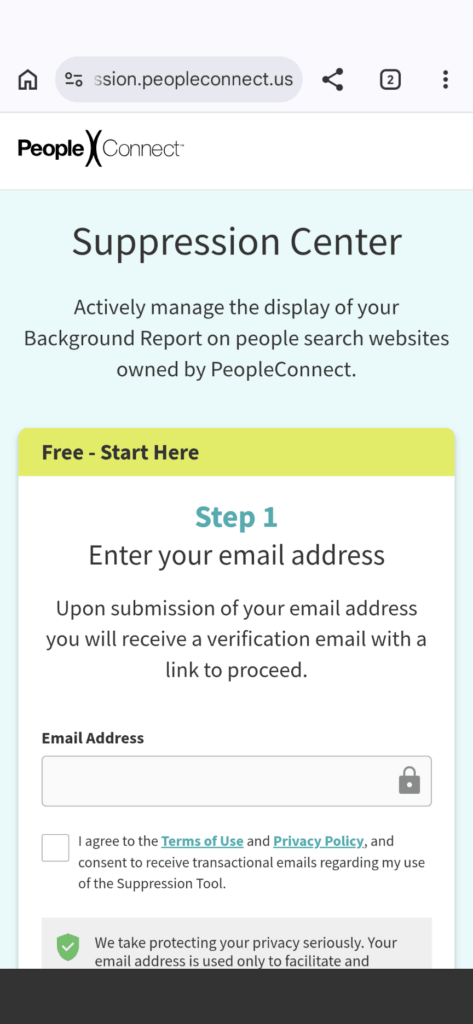
Manually opting out of US Search is tricky. First and foremost, you need to know that US Search is part of PeopleConnect. Therefore, you’ll need to leverage PeopleConnect’s opt out tools in order to begin the process. You can start the manual process here.
1. First, you need to your email on the suppression page
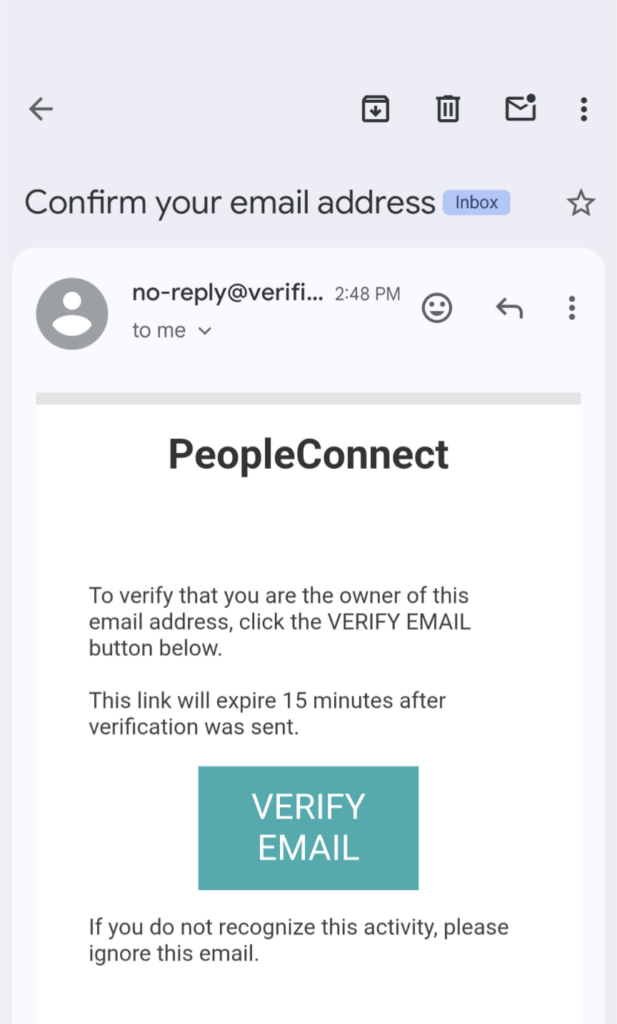
2. Then, you need to verify your email.
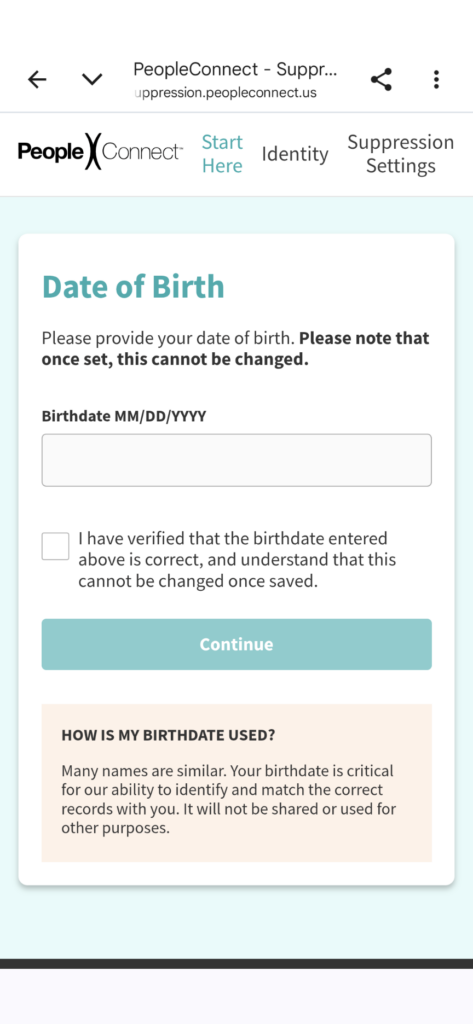
3. Provide your date of birth.
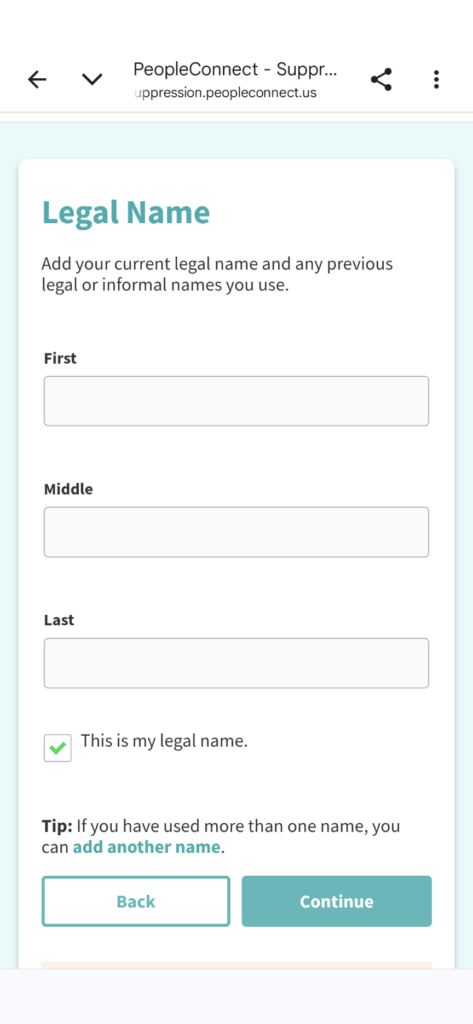
4. Provide your first and last name.
5. Choose the information that matches your profile. Then, provide a verification method via phone or email address.
6. Once your account is verified, you can delete the information from PeopleConnect’s websites.
Opt Out of Similar Sites Today
Unfortunately, US Search is only the beginning. Not only is it one part of PeopleConnect, but it’s also only one of hundreds of people search platforms that harvest and sell your data.
We always recommend using Privacy365 to complete the opt out process. This is due to the fact that we’ll help you opt out of all of these platforms, but in one convenient place.
Say Goodbye to Sites Like US Search
US Search and other opt out sites are some of the worst out there. They store your data, sell it to the highest bidder, and even make it a hassle to opt out of their collection resources.
The good news? You don’t have to worry about these services sharing your data when you work with Privacy365; we take the hassle out of removing yourself from US Search and every site in the PeopleConnect umbrella.
Have More Questions About the US Search Opt Out Process?
Do you have more questions about the US Search opt out process? Well, if you do, stick around because we answer some of the most common questions below.
What Are the Other PeopleConnect Sites?
There are tons of PeopleConnect sites out there. Some of the most common ones include TruthFinder, Intelius, and Instant Checkmate. However, expect the number of these brands to grow over time because the company continues to expand into other person search categories.
How Much Does it Cost to Opt Out of US Search?
Opting out of US Search will cost you nothing if you go the manual route. Well, aside from your sanity and time, especially if you want to opt out of similar platforms. Fortunately, tools like Privacy365 make it easy to remove yourself from US Search, monitor your online data, and more for a low cost.
How Do I Cancel My US Search Subscription?
To cancel your US Search subscription, you’ll need to get in contact with the company. According to most online resources, we recommend calling their customer service line (888) 712-0108 or emailing the company at help@ussearch.com. Of course, you can also do so through your account settings.
Opt Out of US Search Today!
Are you tired of letting data brokers sell, share, and save your online data? And are you tired of feeling defenseless in your efforts? Well, the good news is that you can remove yourself from US Search and many other data broker websites and platforms. The best part? Privacy365 can help you remove yourself from US Search and other platforms altogether; this way, you don’t have to waste any time.
To begin the opt out process for US Search and other sites with Privacy365, sign up today!