Evelyn Sanderson
Updated On : Thu, September 4, 2025Opt Out Guides
Phone numbers are often treated as private, but in reality, they can be one of the easiest ways to find someone online. Sites like USPhoneBook make it simple for anyone to plug in a number and pull up connected details such as names, addresses, and possible relatives.
While this can be useful for reconnecting with people, it also means your own contact details may be just as visible to strangers. This exposure can create unwanted risks, from unsolicited calls to having your information pieced together by data brokers.
The good news is that USPhoneBook provides an opt-out process that allows you to limit how much of your data is displayed. In this article, we’ll walk through what USPhoneBook is, what type of information it shows, and the steps you can take to remove yourself from the site. You’ll also learn how Privacy365 can simplify the process if you want to cover multiple sites at once.
For more resources on taking control of your privacy, check out our Privacy365 data removal guides.
Quick Facts About USPhoneBook Removal
Estimated Manual Removal Time: About 10 to 15 minutes. You’ll need to complete an opt out form and wait for USPhoneBook to process it.
Estimated Removal Time With Privacy365: Around two to three minutes. Privacy365 handles the process for you and includes tracking across other platforms.
What You Need to Remove Your Data: An email address for confirmation.
All About USPhoneBook
USPhoneBook is an online directory that focuses on connecting phone numbers to individual profiles. The platform compiles publicly available records and online data to make it easier for users to identify who owns a particular number or to look up details tied to a name.
Unlike some other people search sites that emphasize professional backgrounds or social media, USPhoneBook highlights contact-related information. A typical listing may include a person’s full name, current and past addresses, known relatives, and linked phone numbers. This makes it a common resource for those trying to verify an unfamiliar call or trace contact information.
Because the data comes from a mix of public and third-party sources, individuals may find their information listed on USPhoneBook even if they never submitted it. For this reason, many people choose to pursue an opt-out request in order to reduce their exposure.
How Does USPhoneBook Collect Information?
USPhoneBook gathers data from a mix of public records, third-party databases, and online sources. In addition, the platform may also link data points from marketing or directory services to create a more complete profile.
Since the information is aggregated automatically, people are often surprised to see how much detail ends up in a single listing. This can include older addresses or outdated phone numbers that are still tied to your name.
Pro Tip: Instead of spending time tracking down every site that lists your information, you can use a service like Privacy365 to handle multiple removals at once.
Why Remove Yourself From USPhoneBook?
Having your personal information on USPhoneBook means that anyone with your name or phone number can quickly access details about you. For some people, this might feel like a harmless convenience, but for others, it raises serious privacy concerns.
Your profile might display your full name, age, current and past addresses, and even relatives connected to you. This can make it easier for strangers to reach out when you don’t want them to, or for marketers and data brokers to compile even more detailed profiles about your life.
Also, if you work in a sensitive field like healthcare, education, or law enforcement, this kind of exposure can carry added risks, since it could compromise your safety, blur professional boundaries, or invite unwanted attention outside of work.
There’s also the possibility of outdated or inaccurate information showing up. An old address or an inactive phone number may give others the wrong impression of your current circumstances. In some cases, this type of information could even affect job searches or personal relationships if someone looks you up casually.
By removing yourself from USPhoneBook, you can reduce unnecessary exposure and maintain more control over how your information is shared. It won’t erase your presence online completely, but it does make it harder for third parties to assemble a detailed picture of your life without your consent.
What Information Does USPhoneBook Collect?
USPhoneBook compiles a variety of personal details from public records and online sources. A single profile can contain a surprising amount of information, including:
- Full name and aliases.
- Phone numbers.
- Residential history.
- Age and birth year.
- Relatives and associates.
- Email addresses.
- Additional public mentions (voter registrations, property filings, or business registrations).
Together, these data points create a snapshot of your life that goes beyond basic details, which is why many users choose to submit a USPhoneBook opt out request.
How to Delete USPhoneBook Records: A Step-by-Step Guide
There are two primary ways to handle a USPhoneBook opt out request. You can either go through it manually by visiting the site and submitting your removal request or use our service to automatically remove your data from not just USPhoneBook but also dozens of similar platforms.
If you want to take the manual route yourself, you will discover how below. We will also touch on how the process works when you use Privacy365.
How to Opt Out of USPhoneBook Manually
Follow these steps to remove your data from USPhoneBook:
Go to USPhoneBook Opt Out Form
Navigate to the official opt-out form at https://www.usphonebook.com/opt-out.
Enter Your Details Into USPhoneBook’s Primary Opt Out Form
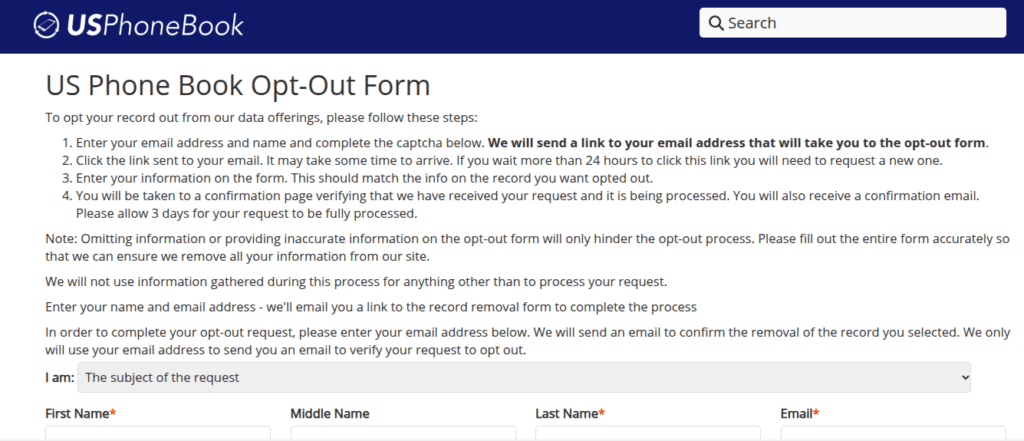
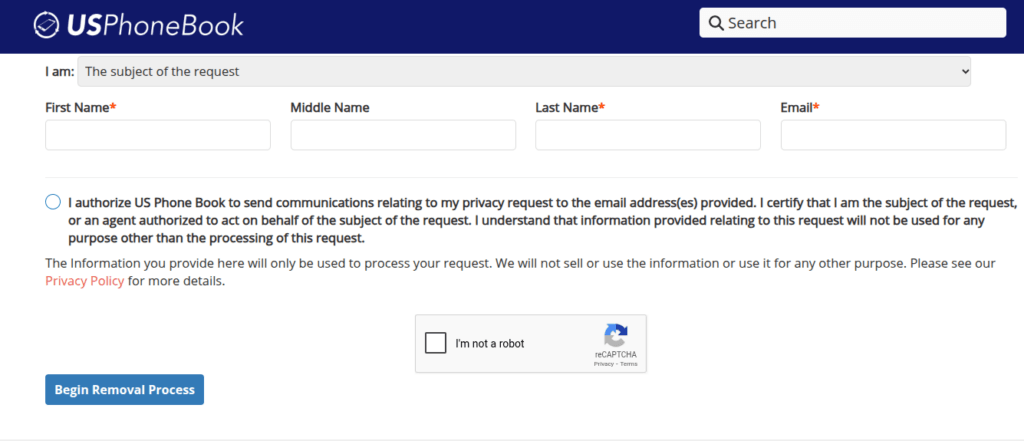
Fill out the first opt out form by entering your first name, middle name, last name, and email address in the appropriate boxes. This, however, isn’t enough for USPhoneBook to remove your information; you will need to do more.
Complete the Actual Opt Out Form
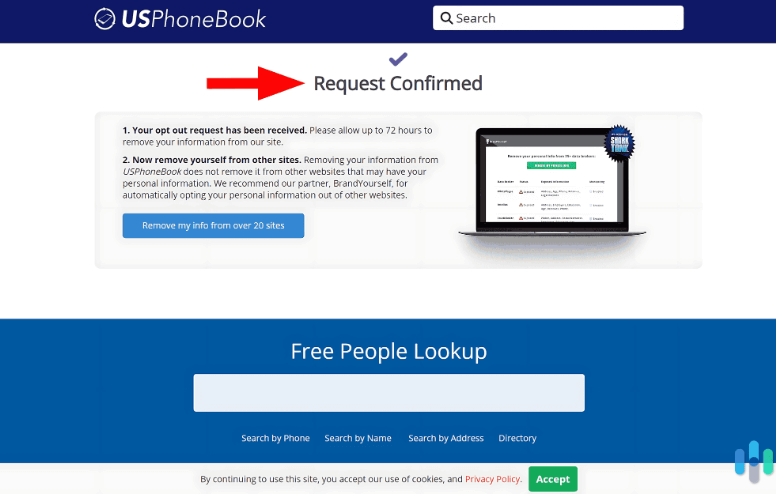
To the email address you entered, USPhoneBook will send the actual opt out form, which asks for more details so that they can find your exact listing. After completing the form, USPhonebook will start processing your request, which can take up to three business days.
You Now Successfully Opted Out of USPhoneBook – What Next?
Completing these steps removes your profile from USPhoneBook, but keep in mind that many other data broker sites may still display your information unless you request removal there as well. Additionally, USPhoneBook can still create a profile if new public records appear, which will require you to submit a new opt out request.
Remove More Data Today
Getting your information off USPhoneBook is just one part of managing your online presence. Dozens of other people search sites may also publish your personal details, often without your knowledge. Removing yourself from multiple platforms strengthens your privacy and limits how much of your life is visible to strangers, marketers, or data brokers.
For step-by-step instructions, explore our Privacy365 opt-out guides and continue building a safer, more controlled digital footprint. Or, sign up to keep your sensitive data safe without spending hours manually removing your data.
Common Questions About USPhoneBook Opt Out
We answer commonly asked questions about opting out of USPhoneBook below.
How Long Does USPhoneBook Removal Take?
Most opt-out requests are processed within three business days. In some cases, you may need to wait longer for search engines to update their cached results.
How Can I Remove Myself From USPhoneBook and Other Sites?
The fastest way is to use Privacy365, which removes your information from USPhoneBook and dozens of other people search sites at once. This saves time compared to submitting individual opt-out requests.
Will My USPhoneBook Listing Reappear After Removal?
It’s possible, since data brokers often refresh their records. If it does, you’ll need to repeat the opt-out or use Privacy365 for ongoing monitoring.
Your Data Is Everywhere. Protect It With Privacy365
Opting out of USPhoneBook is a strong first step toward protecting your personal information, but it’s only part of the bigger picture. Dozens of other sites collect and display similar details, and keeping up with each of them manually can quickly become overwhelming.
Privacy365 makes the process easier by handling multiple removals in one place. Instead of tracking down every platform, filling out forms, and waiting on confirmations, you can manage your entire digital footprint from a single dashboard.
If you’re ready to take control of your privacy across the web, start removing your data with Privacy365 today.